
Run viewer: bide view
bide view serves a read-only web page for one run of a bide journal. It shows what the journal recorded: an agent run's model turns, tool calls, attempts, approvals and halts; a plan flow's declared topology with the path the run took; and, when you give it a signed tree head or an evidence package, whether the journal verifies.
It never writes to the store: it opens a SQLite file read-only (sqlite.OpenReadOnly), reads a Postgres journal in sessions the server holds read-only (postgres.OpenReadOnly), or reads exported journals. It listens on a loopback address only (127.0.0.1 or ::1) and answers only requests addressed to one, so the page is not reachable from another machine. The page needs no network: the binary serves its HTML, CSS and graph, with no CDN. The page is complete without JavaScript: the two small scripts embedded in the binary only add interaction (hover and click on the graph, pan and zoom, copy buttons) and, on the page of a run in progress, the live updates (see Follow a run in progress). The fonts are the system's and there is no request to any other host.
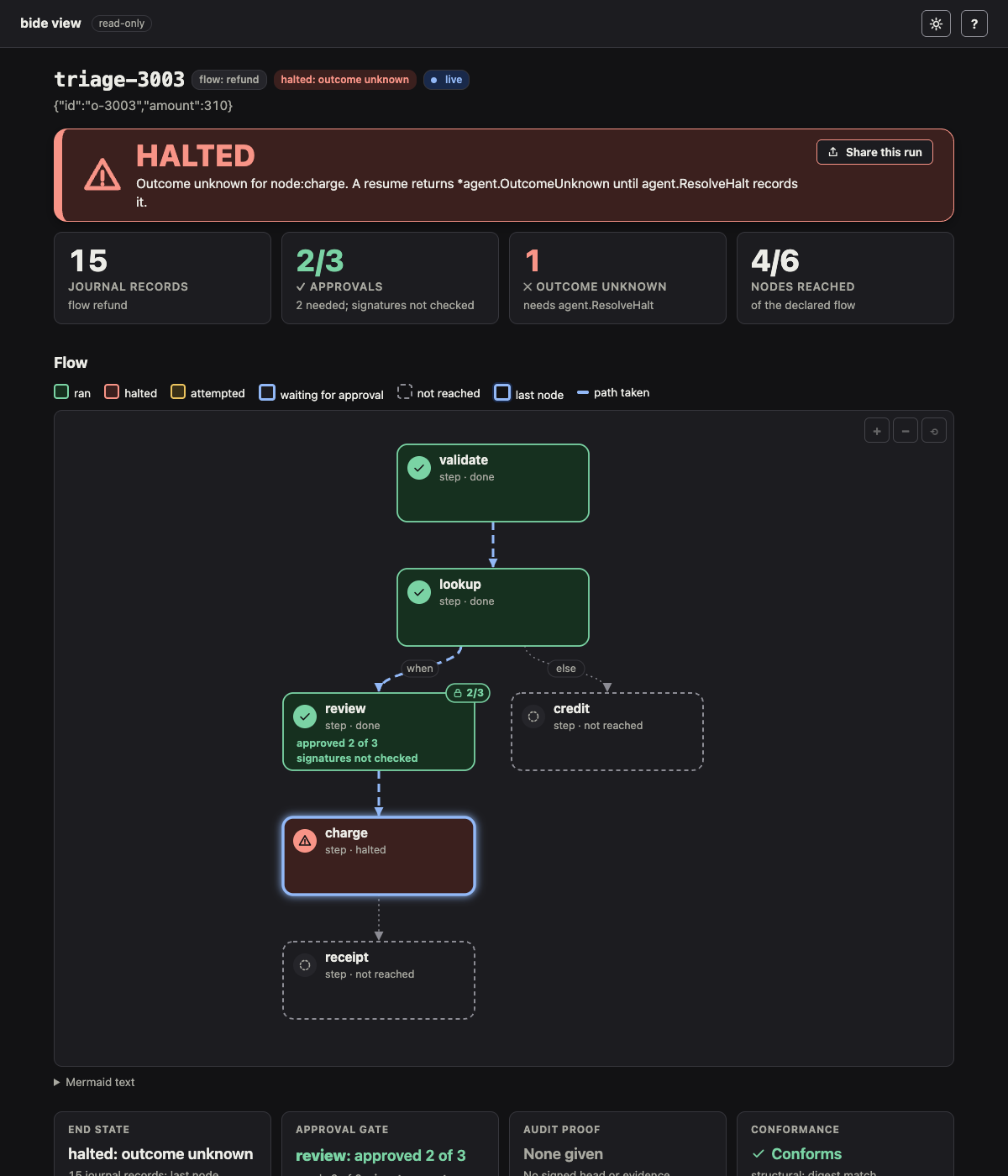
The quickest way to see the page is the crash demo, which needs no API key and no journal of your own. It first shows the same crash without bide (a naive retry charges twice), then kills an agent mid-charge, resolves the halt, and opens this page on the run, with an evidence package and the approvers' keys, so the audit proof and the gate's signatures show as verified, and finally changes one amount in a copy of the journal so that verification fails:
bide demo # -no-browser prints the URL instead; -keep keeps the journal; -fast exits when done (CI)With -keep it keeps its temp directory and prints the bide view command that reopens the run.
Explore a sample journal
To browse many runs at once, with no code and no API key, bide sample writes a journal of 14 runs and opens this page on it:
bide sample                       # writes ./sample.db and its files, then opens bide view on it
bide sample -out DIR -no-browser  # writes into DIR and prints the viewer's address
bide sample -live                 # also keeps one run progressing while you watch (live mode)
The runs are produced by the real runtime, on a scripted model and fake tools: refund agent runs completed, halted with an unknown outcome, halted and then resolved with ResolveHalt, waiting at a 2-of-3 approval gate, approved with signatures, in progress, aborted and cancelled; plan flow runs completed, waiting at a gated node, approved and halted; and a run made of durable steps only. Next to the journal it writes two evidence packages and the keys that verify them, so the audit proof and the gate's signatures show as verified on refund-1041 and refund-1049, and three flow configs: the refund flow, the same flow with its gate lowered from 2 of 3 to 1 of 3, and one with a violated assertion. Its README.txt lists the runs and the exact commands to try: bide view -config, bide check, bide check -diff and bide audit verify-evidence all have something to show.
The runs are the same on every call (run IDs, states, start times and records), except for the random salt each record carries, so the digests and evidence differ; the keys are fixed public sample keys, not for anything real. The viewer is read-only on a loopback address, like bide view. With -live one more run, refund-live, goes on while you watch: it pauses at its gate, gets its two approvals and completes, and its page updates in place (see Follow a run in progress). It is the only run that uses real time. bide sample will not replace an existing sample.db without -force.
Install
bide view is a command of bide, whose module (github.com/bide-ai/bide/cmd/bide) carries the SQLite and Postgres drivers the core module does not:
brew install bide-ai/tap/bide                         # or:
go install github.com/bide-ai/bide/cmd/bide@latest
Every flag of bide view and bide check is listed in the CLI reference.
Run it
On a SQLite journal (the file sqlite.Open writes):
bide view -db run.db                  # the run list
bide view -db run.db -run refund-42   # prints the URL of that run's page
On a Postgres journal (the database postgres.Open writes), given as a pgx DSN:
bide view -postgres 'postgres://user:pass@host:5432/db' -run refund-42Every session it opens has default_transaction_read_only on, so the server refuses any write.
On exported journals (audit.ExportJournal(ctx, journal, runID), marshaled to JSON, the input bide audit prove reads), one file per run:
bide view -journal refund-42.json -journal refund-43.jsonIt prints the URL it serves (by default http://127.0.0.1:8484/) and runs until Ctrl-C; it does not open a browser (unlike bide demo, it has no -no-browser flag). A run's page is at /run?id=<run>, and the same view as JSON at /run.json?id=<run>. A run in progress read from a store also has /run/live?id=<run>&after=<cursor>, which its page polls (see Follow a run in progress).
The run list
With no -run, the page opens on the journal's runs, so you can find the one that halted or is waiting without knowing its ID:
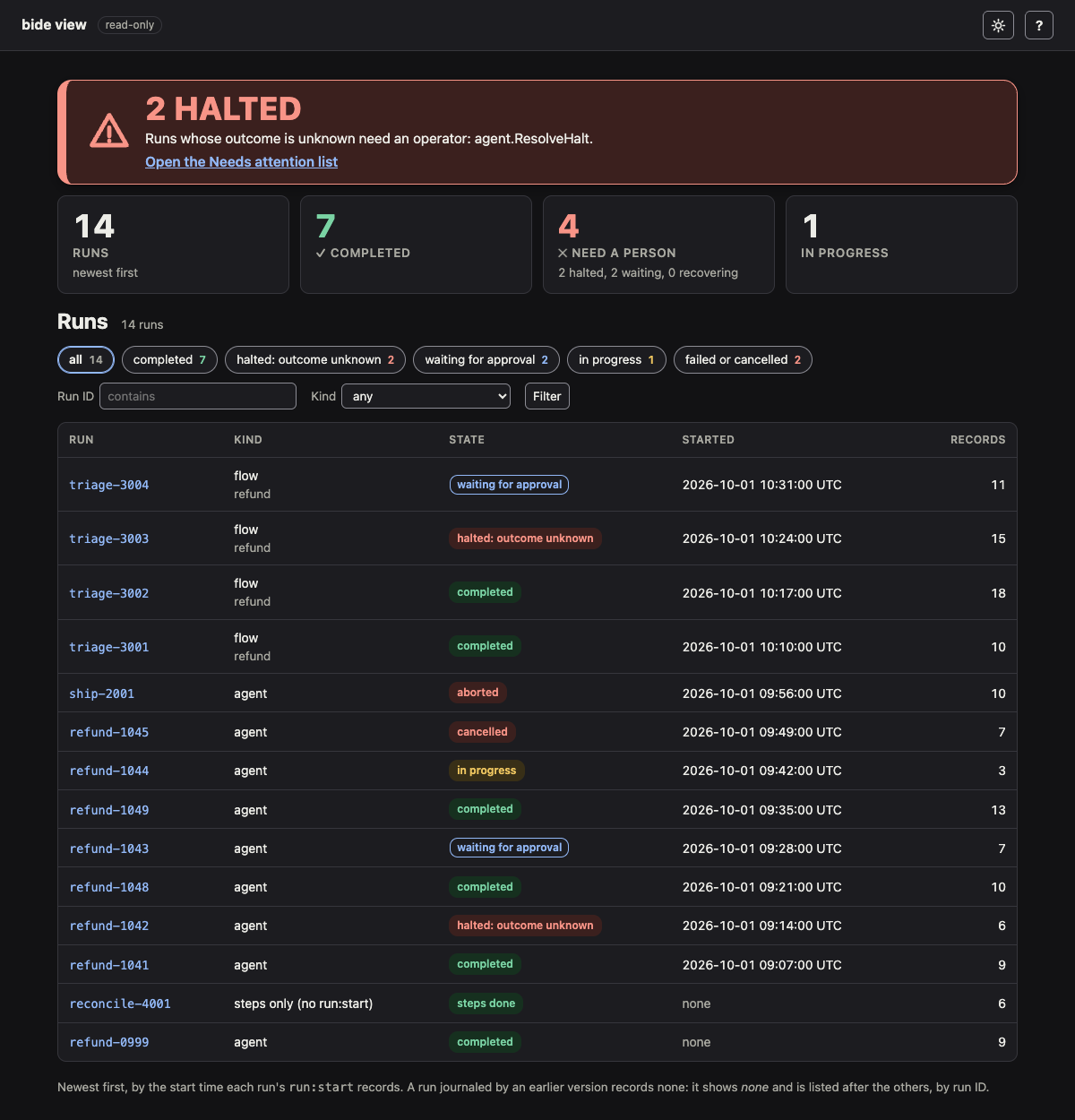
Each row is a run: its ID (a link to its page), its kind (agent, flow with the flow's name, or session turn), its state, when it started, and its record count. The state is the one the run's page shows (see END STATE below), so the list and the page never disagree. The state filters above the table count the runs in each state: completed, halted: outcome unknown, waiting for approval, in progress (started, not ended, not halted and not waiting), and failed or cancelled (aborted, a saga that rolled back, or cancelled), and not started for a run whose journal holds nothing but its header. A run made of Journal.Step calls alone has no run:start, so the journal does not say what it is: it is listed as steps only (no run:start), with a state read from what the journal shows. It is halted: outcome unknown while a step's attempt marker is live with no result, resolved once agent.ResolveHalt has recorded the outcome of one, and otherwise steps done: every step shown has its result. It has no end marker, so the journal cannot say whether more steps will follow; the done and resolved runs are counted with the completed ones. Its page has the same Halts panel and ResolveHalt snippet as any run's. The kind filter and a run ID filter (a case-insensitive substring) narrow the list further; the filters are in the URL (/?state=halted&kind=flow&q=refund), so a filtered list can be bookmarked. The same list is JSON at /runs.json, with the same query.
Started is the time the run's run:start records (RunStart.StartedAt): when its first drive began, by that drive's clock, shown in UTC. The list is ordered by it, newest first. A run journaled by an earlier version, which recorded no start time, shows none and is listed after the others, by run ID. The journal records no end time, so the list shows none.
The headline's link, and the need a person number, open the Needs attention list when a run is halted, waiting, failed or has a failing recovery.
The headline is ALL CLEAR only when the viewer read everything it should have and found nothing: the store lists its runs, every listed run was read (no listing or read failure, none past the cap below), no filter narrows the list, the notification trail was read for every run, and no run that has not ended has a failing recovery. Anything less is not a clear page, and says what it cannot rule out, in a color that is not green:
| Headline | Why |
|---|---|
| CANNOT LIST | the store has no agent.Lister, so the viewer cannot enumerate its runs (open one with -run) |
| NOT EVERY RUN WAS READ | a listing or a run's journal failed, or more than 5,000 runs matched; the count of runs not read is on the page and in the JSON (unread, truncated, error) |
| NOTHING IN THE JOURNALS NEEDS A PERSON | no run is halted, waiting or failed, but a recovery failure is not in the journals: without the notify trail (an exported journal, or a trail that could not be read) it cannot be ruled out |
| NOTHING IN THIS FILTER NEEDS A PERSON | a run ID or kind filter is set, so the page speaks for the runs it admits |
When a page has something to do and also did not read everything, its banner says what it left out. The JSON of the run list and of the Needs attention list carries status, from the same headline: attention, clear or unknown, so a script does not have to parse words. The page also shows the class of a store error (store error, timed out), never the store's own text, which can carry a connection string. A listed run with no records is counted and noted (empty).
The viewer reads each unfinished root run's trail when it loads the list, one read per run, and one more to notice a store it cannot read when no run needed one. An event of a run is looked for in the trail of the root its ID names (a sub-agent's) and in the run's own (a flow gate files its pause under its own run); a build that takes more than 30 seconds fails as "timed out" and the page says so. Both lists are served again for two seconds, so a page that refreshes itself, or several viewers, cost the store one read of its runs per two seconds.
The list shows 50 runs and a Show more link for the next 50. To classify a run the viewer reads its journal, so one load reads at most 5,000 runs (the first by run ID among those the run ID filter admits) and says so when there are more; narrow the run ID filter to reach the others. An exported journal holds one run, so -journal lists as many runs as files it is given, and the page says so when it is one. Two files that export the same run ID are refused as a usage error (exit 2) naming both files, so a stale or substituted copy cannot stand in for the run.
The screenshot is of the journal bide sample writes (see Explore a sample journal); assets/demo/shots.sh retakes it, and the halted flow, the risk map and the violated assertion below, from bide sample. assets/demo/shots-approval.sh retakes the approval run's screenshots (halted, verified, timeline) by driving examples/approval.
Needs attention
The run list's headline says how many runs need a person, and links to the page that lists them: /attention (as JSON at /attention.json). It is every run in the journal that is waiting on a human, so it is the first thing to open when a notification arrives (gates with a deadline come first, nearest deadline first, then the rest newest first):
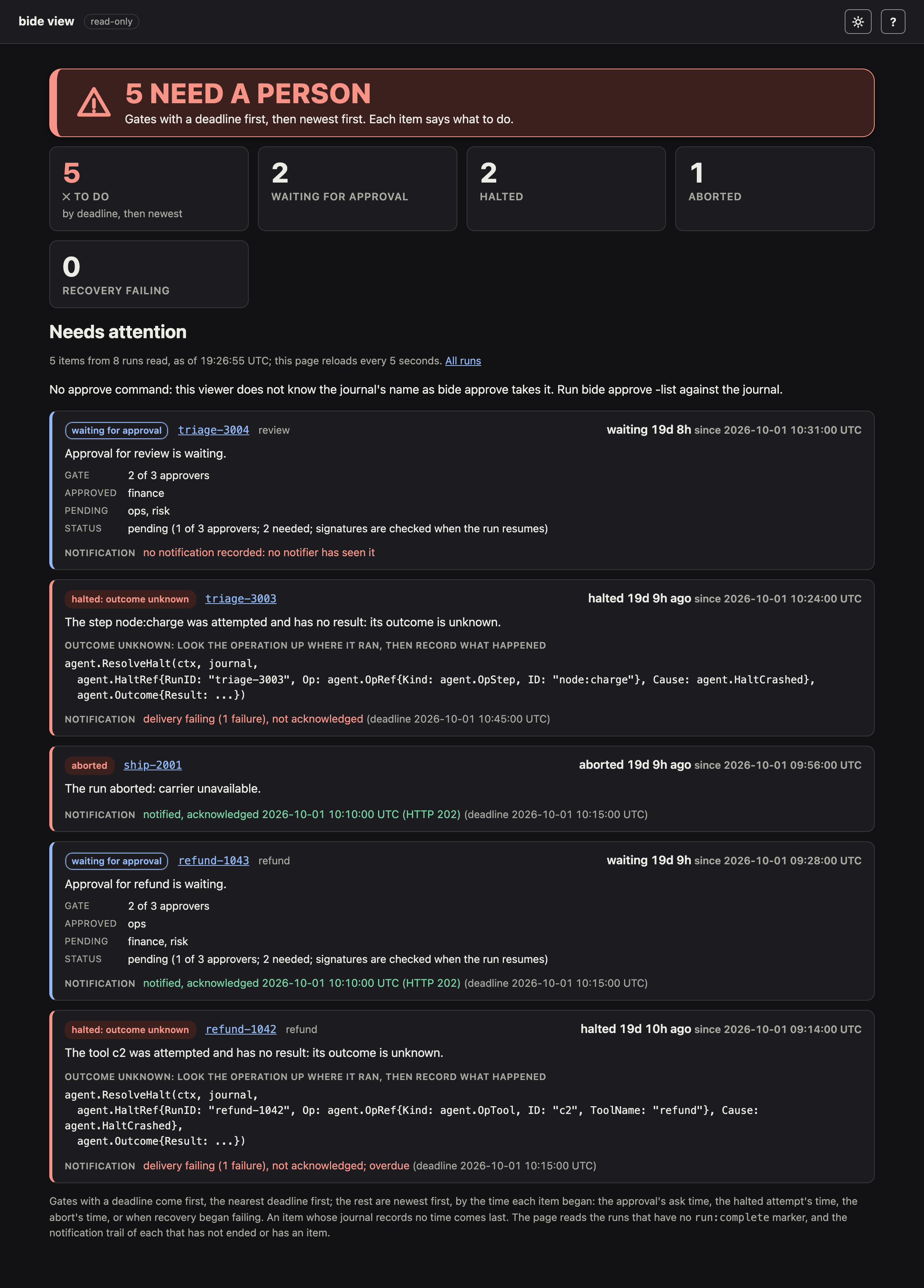
Each item is one thing to do, and says since when:
Waiting for approval: the call and its tool, the gate (k of n), who has approved, who has denied and who is still pending, and how long it has waited (from the time the run asked,
AskedAt). A gate with a deadline shows it and the time left (due in 40m 00s (2026-10-15 10:00:00 UTC)), flagged DUE SOON within the hour. A gate whose deadline has passed but whose expiry no drive has recorded yet is flagged OVERDUE and has no command: it refuses decisions, and the run records the expiry the next time it is driven (the call does not run). The JSON givesexpires_at,due,due_soonandoverdueon the item'sgate.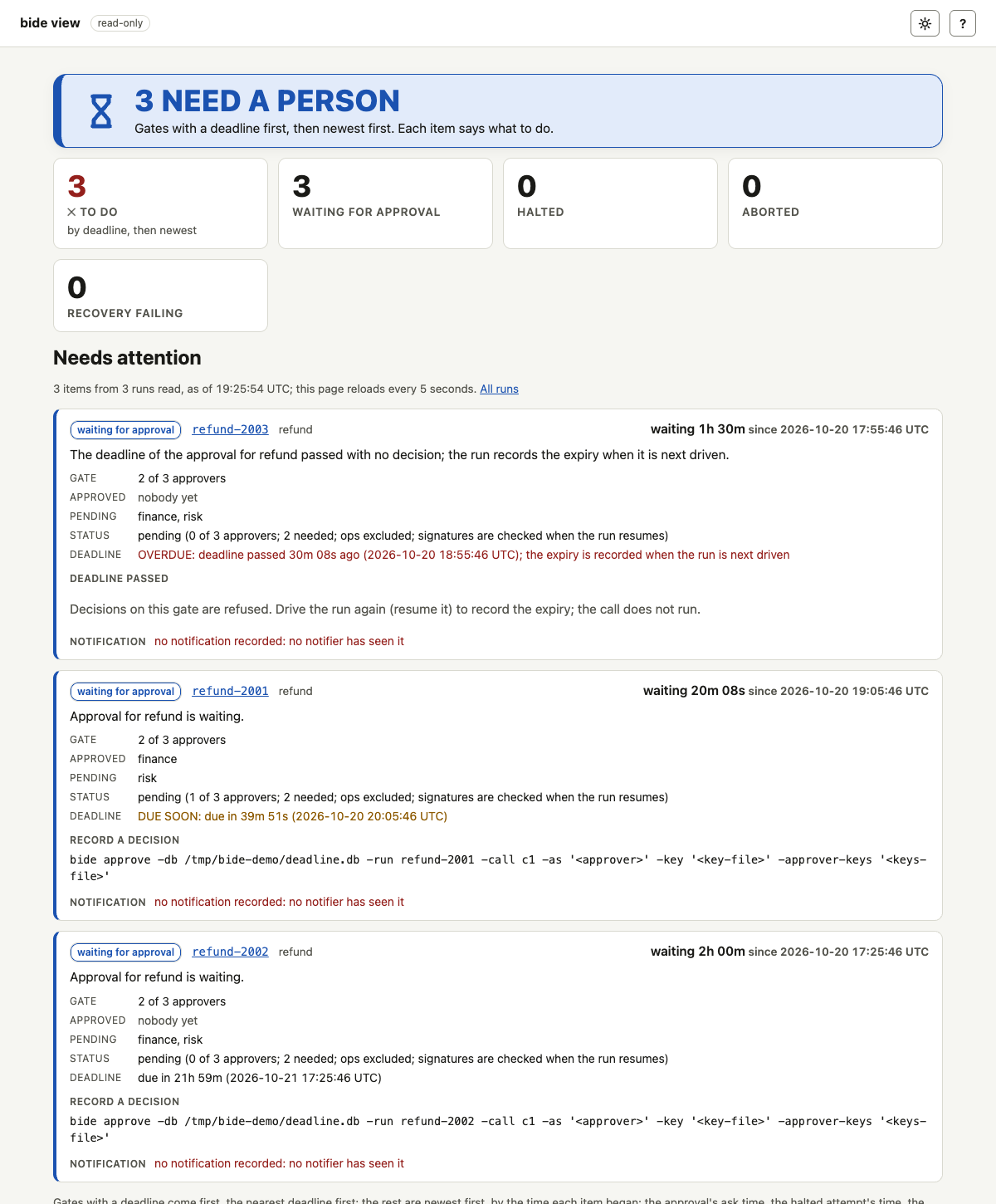
The command that records a decision is shown with it, as
bide approvewrites it (approveline.Command): the journal by its absolute path for-db, by the variable you gave-postgres-envfor a Postgres journal, and by the placeholder<VAR>when you gave a raw-postgresDSN, since a DSN holds a password and is never put in a command. The approver's own id and key files are placeholders too. Every value is quoted for a POSIX shell, so a run or call ID with a quote, a space,;or$(is one word (also for a Windows-dbpath: the quoting is POSIX's, for a POSIX shell, so incmd.exeor PowerShell quote the path yourself); an ID with a control, bidirectional or invisible character gets no command: the run or call id holds a character that cannot be shown or pasted safely instead, with the way out:bide approve -list -jsonprints the call with its IDs JSON-escaped, andbide approve -item FILE(or-item -with-yes, from a pipe) reads that one call's object and takes the run and the call from it exactly, so nothing has to be pasted or quoted (give-iteminstead of-runand-call, not with them). On a gate with both bare-key and certificate-bound approvers the item names each kind: the bare-key approvers decide with-key, the certificate-bound ones with-certand-identity-policy. An exported journal has no store to name, so it shows none. A gate with a certificate-bound approver says why it waits and shows the identity of each counted decision (see Approver identity):paused: identity status unknown,decision recorded, not yet provable, or, for a call that was counted but not run,held before execution: ...(that item needs a person although no decision is wanted). Nothing here is drawn green without an audit result. The JSON gives it as the item'sgate.identity.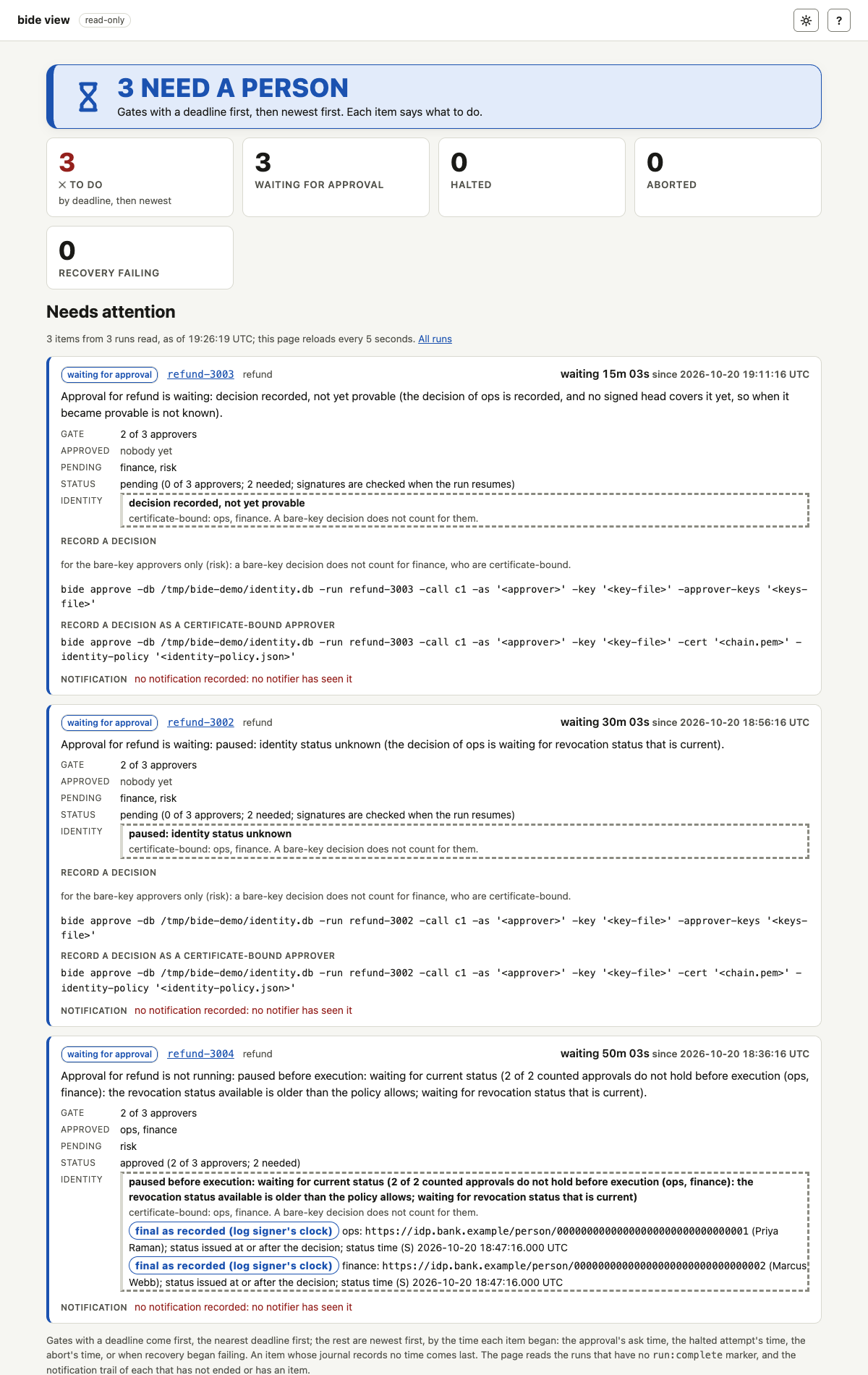
Halted: outcome unknown: the operation whose attempt marker is live with no result, when it was attempted, and the
agent.ResolveHaltcall with itsHaltRef, as on the run's page. Resolve it only after looking the operation up where it ran.Aborted: a saga that rolled back, with the reason and the time it aborted (a run aborted by an earlier version records no time, and is dated by its start).
Recovery failing: a recovery pass has kept failing for the run, and the cause class. The journal does not record this, so it is listed only when the notification trail is available.


A run that has ended (completed, aborted or cancelled) has no approval to give: a run cancelled at a gate is not listed for it. A halt stays listed even after the run was cancelled or aborted, since ending a run does not say whether the operation it attempted took effect. Gates with a deadline come first, the nearest deadline first (a passed one before the rest); the other items are ordered by the time each began, newest first, and an item whose journal records no time is listed last and says so.
Notification. With -db or -postgres the viewer also reads the notification trail that the notifier (agent.WithNotifier) keeps in the event store of the same database, and each item then says whether it was notified and whether the sink acknowledged it: notified, acknowledged at ... (HTTP 204), delivery attempted, not acknowledged, delivery failing, seen by a notifier, not delivered yet, or no notification recorded when no notifier has seen it, and overdue when it passed its deadline unacknowledged. The deadline is shown too. This is the notifier's record, by its clock: a 2xx answer means the sink accepted the request, not that a person read it (see Notifications). A trail that cannot be read is said on the page, which then does not say that nothing needs a person; the items still show what the journals say. An exported journal (-journal) has no trail, and the page says it does not say whether anyone was told. bide sample seeds a trail by running the real notifier's catch-up sweep twice (an acknowledged gate and abort, a halt whose sink refuses it, failing and overdue, and a second halt that is failing and not yet overdue), so the screenshot above shows each state. A sub-agent's run is matched to its root run's trail, where the notifier records its events.
In live mode (-db or -postgres) the page reloads itself every 5 seconds with a <meta refresh>, so it needs no JavaScript and stays current as runs stop and are decided; the page says so. The reload cannot pause while the tab is hidden without a script, so a hidden tab keeps reloading; the two-second cache is what bounds its cost. The list reads only the runs that have no run:complete marker (the store filters the others out in its listing, so a store of many finished runs costs it nothing), so it has no 5,000-run cap, and reads the notification trail of each that has not ended or has an item. An aborted or cancelled run is listed too, since a halt outlives either. The page works without JavaScript, like the rest of the viewer.
Flags
| Flag | Meaning |
|---|---|
-db <file> | SQLite journal to read, opened read-only. Give one of -db, -postgres and -journal. |
-postgres <dsn> | Postgres journal to read, a pgx DSN; read in read-only sessions. |
-postgres-env <VAR> | The Postgres journal, its DSN read from this environment variable instead of the command line, so the password stays out of the argument list. The value is a variable's name (letters, digits, underscore); a DSN given here is refused without being echoed. Exclusive with -postgres. The Needs attention list's bide approve commands name the same variable. |
-journal <file> | An exported journal (audit.JournalExport JSON). Repeat it for several runs; two files of the same run are refused. |
-run <id> | The run whose URL to print. Without it, the printed URL is the run list. |
-topology <file> | A declared topology, as JSON of flow.Topology(), to draw a flow run against instead of the topology the run journaled: for a run started before flow:topology was journaled, or to check a run against another flow. |
-digest <hex> | flow.Digest() of the -topology flow, compared with the digest the run journaled. Needs -topology. By default it is computed from the -topology file when the file carries the digest's inputs (a topology exported by this version does). |
-sth <file> | A signed tree head (audit.SignedTreeHead JSON) to verify the journal against. Needs -pubkey. |
-evidence <file> | An evidence package (audit.EvidencePackage JSON, as audit.Evidence writes it) to verify. Needs -pubkey. |
-pubkey <key> | The log's public key: <scheme>:<hex> (ed25519, ecdsa-p256, ml-dsa-65, ed25519+ml-dsa-65), bare ed25519 hex, or a file holding either. |
-approver-keys <file> | The approvers' public keys, the file bide audit verify-approvals reads: a JSON object of approver id to key text, such as {"ops":"ed25519:ab12..."}. With it, each m-of-n gate's signatures are verified. Needs -sth or -evidence. |
-need <k>, -approvers <a,b,c> | The policy you expect (k of these approvers, in policy order). With them the signatures are verified against this policy, as bide audit verify-approvals -need -approvers does, and a gate whose recorded policy differs fails. Need -approver-keys. |
-exclude-principal | With -need: the policy you expect excludes the run's requester (separation of duties), and a gate that did not fails. The page marks the requester's card as excluded and names the requester in the gate table either way. |
-config <file> | A flow config (.json, or .yaml/.yml) to show instead of runs; see Check a flow config. Takes none of the run flags. |
-check | With -config: serve nothing, print each problem as file:node: message, and exit 1 if any is an error. bide check <file>... is the same check, for several files. It also prints a taint line (a taint section with -blocks, else taint: not known without -blocks), so the output of a clean config is not empty; the exit status is unchanged. |
-strict | With -check: exit 1 on a warning too (bide check -strict). |
-diff <old> | With -config: compare it with an earlier version, a file or a git revision; see Compare two versions of a flow. With -check, print the changes instead of serving the page. |
-fail-on-weaken | With -diff -check: exit 1 if an approval gate was removed or weakened (its need lowered, an approver added without raising the need, exclude_principal dropped, or its timeout removed or lengthened), a node became reachable without a gate that every path reached through one before (whatever its safety), a new effect has no gate, a node's safety was lowered, a Switch condition changed beside an ungated effect, an exposure to untrusted data that nothing covers (a side-effecting node newly reads a declared source with the policy known to be absent, or a node no longer declares a source), a diff whose taint could not be compared (the policy is not given, or only one side has blocks and it states a source: not certified), or an assert line was removed, loosened, or kept and no longer holds. With no blocks on either side, taint not compared (no -blocks) is printed and nothing else changes. |
-blocks <file> | With -config: a description of the program's registered blocks (a program writes one with json.Marshal of plan.Registry.Describe()), so the check covers block, predicate and merge names, types, safety, the approval gates blocks declare in Go, and the digest without the program. See Check against a description. |
-old-blocks <file> | With -diff: the description for the earlier version (default: the -blocks file). |
-stop-policy <file>, -stop-root <digest> | The kill switch's stop policy (the JSON bide stop -stop-policy reads), so the stop banner and the held-by-stop states check the control run's signatures as an audited deployment does; -stop-root names the root policy when the file is a later one. Without them the control run is read as a basic one and the banner says signatures are not verified. Store inputs only. |
-addr <host:port> | Where to listen: a loopback IP or localhost, with a port. Default 127.0.0.1:8484. Any other host is refused. |
-color <when> | auto (the default), always or never: whether the text output (the address to open, and -check's lines) is colored. auto colors a terminal only, unless NO_COLOR is set to any value or TERM is dumb; see Color. |
Input files are read strictly, as bide audit reads them (audit.UnmarshalStrict): a duplicate or unknown field is an error. bide view -h prints the same list. Exit status: 0 after a clean stop or -h, 1 if an input cannot be read or the server fails, 2 for a usage error.
The page
Every page opens with a verdict: one state in large type, with a glyph and a line of why (so the state is never carried by color alone), and three or four key numbers under it. On a run page:
| Verdict | When |
|---|---|
VERIFIED | the run completed, and the audit proof verifies (-sth or -evidence) with no approval gate's signatures failing |
COMPLETED | the run completed and no proof was given, so nothing is verified |
HALTED | an operation's outcome is unknown: it needs agent.ResolveHalt |
WAITING FOR APPROVAL | the run is paused at an approval gate |
FAILED | the run aborted or was cancelled, or it completed but its proof or an approval gate's signatures do not verify |
IN PROGRESS | the run has started and has no end marker yet |
When the run's end marker notes when it was written, the verdict adds a line, Ended <time> UTC, and a result that agent.ResolveHalt injected adds one, A halt was resolved at <time> UTC. Both are the clock of the process that wrote the record, not a time anything signs, and a journal an earlier version wrote shows neither. The numbers are the journal records, how many of them the signed head covers, the first approval gate's approvals (2/3 with its signature verdict), the operations whose outcome is unknown, the flow nodes reached, and the tool results. A config page opens with N POLICY VIOLATIONS (the violated assertions), N CONFIG ERRORS, N ASSERTIONS UNDECIDED, ALL ASSERTIONS HOLD or NO ASSERTIONS, in that order. A diff page opens with APPROVAL GATE WEAKENED, with each weakened gate under it, whenever one was weakened, and otherwise with the number of changes. The run list opens with what needs a person: N HALTED, N WAITING FOR APPROVAL, N FAILED OR CANCELLED or ALL CLEAR. The cards below the verdict are short: a label, a value and a line, with the detail in a details element. The JSON views do not carry the verdict.
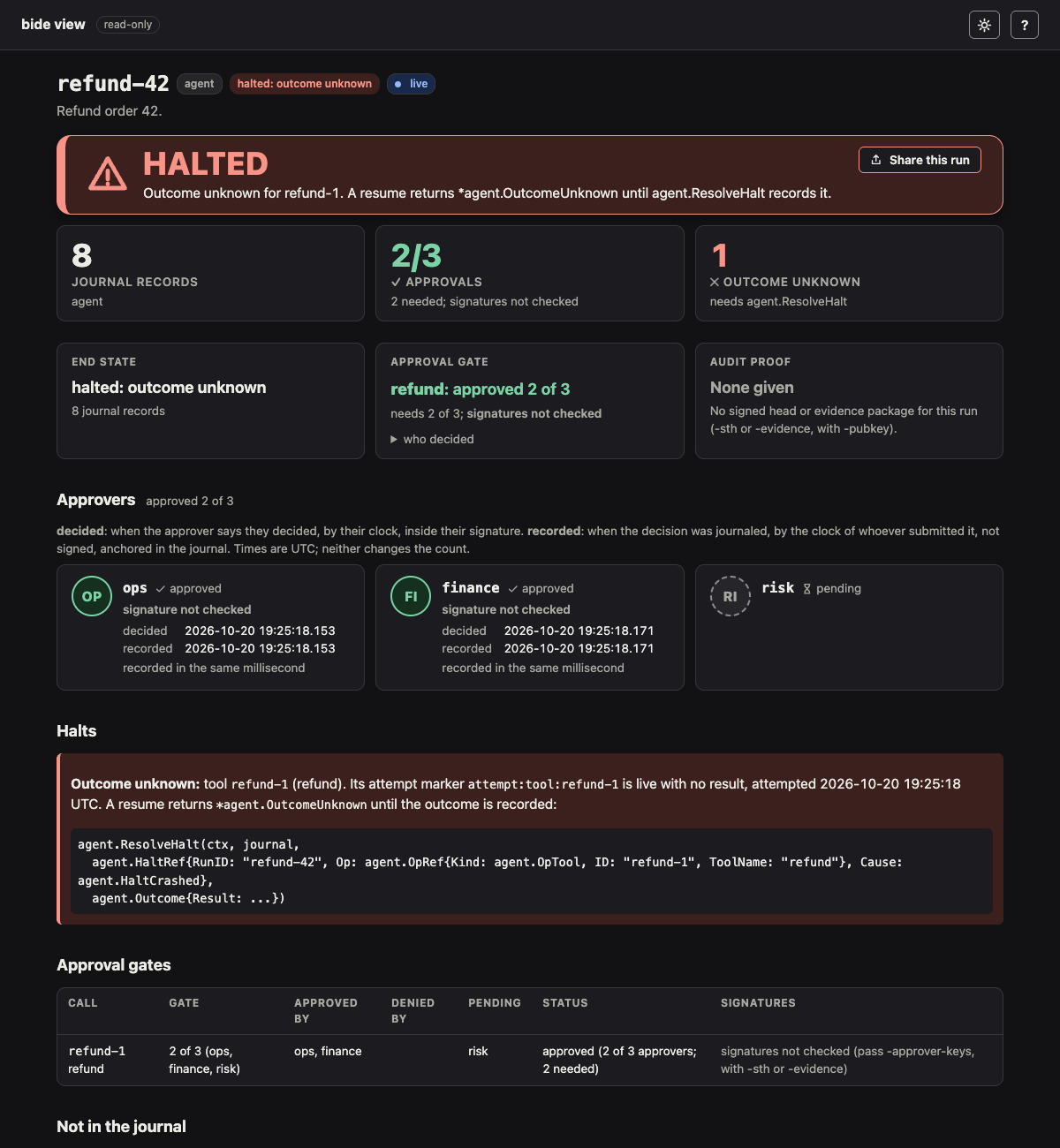
END STATE. The run's state as agent.Status reads it from the journal, with two refinements:
- halted: outcome unknown: the run has a live attempt marker with no result (a side effect started and its outcome was lost, for example to a crash). A resume returns
*agent.OutcomeUnknownuntil the outcome is recorded. See Halts below. - waiting for approval: the run paused at an approval gate (it journaled
approval-pending:for the call) and the gate has not decided. A gate that asked again (its policy came to exclude the requester, or its tally predates the decision format) journals a re-ask note (approval-pending:<id>:sodor:v3); the viewer reads the newest note, so it shows the gate waiting under the policy it asks under, with the re-approval reason, and the timeline shows "asked again for approval". - started: the run is in progress, as far as the journal shows.
- completed, aborted, cancelled: the run's first end marker, with the reason a cancellation or abort recorded.
The card also gives the record count and the last plan node the run reached; the run's terminal reason and the model's last text are under details.
APPROVAL GATE (when the run has one). Each gate in a line: the gated call or flow node and where it stands (refund: approved 2 of 3), the policy, who approved or denied, who is pending, and whether the signatures verified (see the Approval gates table below for the full detail). A gate with a deadline also says where it stands on the viewer's clock: due in 40m 00s, deadline passed 30m 00s ago (still waiting: no drive has recorded the expiry, and the gate refuses decisions), or expired, which is the gate's recorded outcome (the call never ran).
A gate the application holds for a reason beyond its tool's own (the escalation gate of a tainted call, or a cap rule) carries a why this gate fold in its card. It lists the reasons as lines: the untrusted content the turn read, where it came from and at which journal position, or the cap rule and this call's figures as of the ask. They come from the gate-reason record the engine wrote when it held the call, and the card labels them as the application's record, which is not part of what an approver signs. The JSON view carries them as why on the gate. bide approve -list shows the same reasons (see HITL approval).
AUDIT PROOF. Given -sth or -evidence and -pubkey, whether the journal verifies, checked with the audit package's own verifiers, as bide audit does:
- with
-sth: the head's signature and timestamp, and an inclusion proof of the last record it covers, built from the journal shown (audit.ProveRecord,ProofBundle.Verify). A head that does not commit to this journal does not verify. - with
-evidence:EvidencePackage.Verify(the seal, the key, the run binding, and every proof in the package, listed one per line), and the same check of its head against the journal shown.
The card says how many records the head covers: records written after it are listed as not yet covered. Without -sth or -evidence the card says so.
With -approver-keys as well, the card gives a line per m-of-n approval gate whose tally is journaled: whether its approvals verify, from audit.VerifyApprovals, the check bide audit verify-approvals runs. It verifies the proofs of the request, every decision the gate read, the tally and the result under the log key; checks each decision's signature with the approver's key against the exact call; recounts with the gate's rule; and requires at least k. With -evidence it checks the package's actions; with -sth it builds the same evidence from the journal under that head (audit.ApprovalEvidence). Without -need and -approvers it checks against the policy the gate journaled in its tally, and says (against the recorded policy). With them it checks against the policy you expect, says (against the expected policy), and a gate that recorded another policy fails with, for example, recorded policy 1 of 3 (ops, finance, risk) differs from expected 2 of 3 (ops, finance, risk).
CONFORMANCE (plan flows). Whether the run followed the declared topology: the run is of the topology's flow, every node it recorded is declared, every Switch choice is a declared arm, and the journaled digest equals the topology's. The card says where the topology came from:
Topology from journal (digest verified): the topology the run's first drive journaled underflow:topology, drawn only onceplan.JournaledTopologyhas checked that its digest (plan.TopologyDigest) is the run'sflow:digest. A record whose digest differs is not drawn, and the page says why.Topology from -topology: the file you gave, which overrides the journaled one;(digest computed from it)when no-digestwas given and the file carries the digest's inputs.
From the command line this check is structural. plan.Conform also replays routing, loops and completion; a Go program that embeds the viewer with the *plan.Flow gets that check instead.
Flow (plan flows). The declared topology, drawn on the server as a layered SVG (the layout is the viewer's own, with no library): each node a rounded box with a glyph for its state (ran, halted, attempted, waiting for approval, not reached), the last node outlined, and the path the run took drawn as a flowing dash, which stops under prefers-reduced-motion. A counterexample path is a heavy dotted line instead, so the two differ without color; a node's problem mark is a circle and a warning's a diamond, and a warning's box is dashed. A gated node wears a badge on its corner (2/3) and shows its gate in its box: waiting, 1 of 2 approvals and who is pending, or approved 2 of 3 and signatures verified (or signatures NOT verified), and its tooltip the full status. The graph is complete without JavaScript. With it, hovering or focusing a node highlights every path through it, clicking a node (or pressing Enter on it) shows its details under the graph, and the buttons at the graph's corner zoom and reset it (ctrl or cmd and the wheel zoom too; drag pans a zoomed graph). The Mermaid text of the same graph is below it.
Halts. Each operation whose attempt marker is live with no result: the tool call or step, its marker, when it was attempted, and the agent.ResolveHalt call that records its outcome once you have confirmed it (from the provider's record, say):
agent.ResolveHalt(ctx, journal,
	agent.HaltRef{RunID: "refund-42", Op: agent.OpRef{Kind: agent.OpTool, ID: "refund-1", ToolName: "refund"}, Cause: agent.HaltCrashed},
	agent.Outcome{Result: "$120 to order 42", Evidence: map[string]string{"provider_refund": "re_42"}})
Approval gates. One row per gated tool call or plan flow node (named by its key, such as node:refund, with its input in the timeline's approval requested row): the gate (k of n and the approvers, or one decision), who approved, who denied, who is pending, and a status such as approved (2 of 3 approvers; 2 needed), denied (...) or pending (0 of 3 approvers; 2 needed; ...). Once the gate decides, the counts are the tally it journaled; before that they are the signed decisions recorded so far, whose signatures the gate checks when the run resumes.
Deadlines. A gate with a timeout shows it in the policy cell (times out after 24h) and its deadline in the gate card. A gate that expired has the status expired (1 of 3 approvers; 2 needed; the gate's deadline passed first), drawn red like a denial. A signed decision recorded after the deadline, or after the gate recorded its expiry, is on the approver's card as not counted, with the reason (recorded after the gate's deadline, or written after the gate expired), and is not in the counts. The time left is read from the viewer's clock (Options.Now); the deadline itself is the gate's recorded approval-deadline record.

In the expired-gate run, risk's approval was stamped and recorded a second before the deadline, but its write landed after the gate read the journal and before the gate recorded its expiry; the expiry, recorded first, is the outcome, so the approval is not counted and the call never ran.
Both images come from assets/demo/shots-deadline.sh, which writes a small journal with the real agent runtime and a controllable clock (assets/demo/setup/deadline.go).
The Signatures column says whether the approvals were verified (see AUDIT PROOF):
2 of 3: signatures verified (ops, finance) (against the recorded policy):audit.VerifyApprovalsheld with the keys given.signatures NOT verified: ...: it did not, with every reason: a decision that did not count and why (a signature that does not verify under the approver's key, an approver with no key), the count below k, or evidence that is inconsistent (a decision the gate read and the evidence omits, a recount that disagrees with the tally).included in the signed log; signatures not checked (pass -approver-keys): the journal verifies under-sthor-evidence, but no approver keys were given.signatures not checked (pass -approver-keys, with -sth or -evidence): no proof was given.signatures not checked: the proof given is for another run (signed head: "run-b"); give -sth or -evidence for this run: a-sthor-evidencewas given, but for another run than this one (up to three are named, a run ID shown escaped and cut at 64 characters; shown only when no proof was made for this run). Open the run the head or package is about, or give one for this run. Nothing was checked for this run.signatures not checked: the gate has not journaled its tally yet: the gate is still open.- A one-decision gate (
agent.SingleApproval, recorded withagent.Approve) is not signed, so there is nothing to verify.
Approvers. For a gate with several approvers, one card each: initials, the approver's id, whether they approved, denied or have not decided, and, for a decision, whether its signature verified (signature verified; signature NOT verified with the reason; in the signed log, signature not checked when a proof was given without approver keys; signature not checked otherwise), the fingerprint of their key (ed25519:3b6a27bc, the first 8 hex digits of the SHA-256 of the public key, with -approver-keys), and the decision's two times, kept apart: when the approver decided (decided, their clock, inside the signature, so it cannot change after signing) and when it was journaled (recorded, the submitter's clock, not signed, anchored by the journal's Merkle trail), with the gap between them, shown without judgment. A card notes a signed time more than 5 minutes after the recorded one (the approver's clock runs ahead) and a signed time before the run asked for approval (their clock runs behind, or the decision was signed in advance); the gate orders decisions by journal position, never by these times, so a note never changes the outcome (see When a decision was made). With approver keys the times are those of the decision the recount counted. A one-decision gate is not signed and has no cards; its "who decided" detail says when the decision was recorded, by the clock of the process that called Approve.
Approver identity. A gate with a certificate-bound approver (see the approver identity design) adds an identity block above the cards and an identity panel in each certificate-bound approver's card. The panel shows the verified canonical identifier (https://idp.bank.example/person/...), the display name from the certificate's subject (the CA's label for the person, not part of the identity), the tier, the basis, the status time S with its age, when the decision became provable and what that time rests on (log signer's clock, RFC 3161 time-stamp, anchor receipt), the window, and the leaf's hash. All of it is as recorded at counting by the gate: the page says so, with the caveat that a revocation first reported after S is not covered. The tiers are final as recorded (log signer's clock), final as recorded (independent time) (when the policy sets IndependentTime) and PROVISIONAL; any other value is NOT VERIFIED. A card of a bare-key approver on such a gate says bare key (no identity).
The rule the page keeps: nothing is green, and nothing is called "verified", unless an audit result the viewer was given re-checked it. The journal alone gives, at best, final as recorded, drawn in a neutral blue style. Provisional is amber with a dashed edge and a hatched ground and says PROVISIONAL; a decision the gate has recorded but not counted is recorded, not counted; neither makes the gate, the card or the run's verdict green. A finished run whose proof fails or whose signatures are bad is FAILED whatever its identity says; it is VERIFIED only when its audit proof verifies and no gate is in these states: a gate whose identity is only final as recorded reads COMPLETED, and one that is provisional, waiting or held reads IDENTITY NOT FINAL. A result in ApprovalCheck.Identity (keyed by approver, with the digests of the tally and policy it examined, which must be the journal's current ones, and when it ran; what an audit recomputed from the decision records, heads, chains and status bytes) turns a final decision green (audited), or marks it DISPUTED in red: newer status shows a keyCompromise revocation effective at or before the decision became provable, which voids the count back to the certificate's notBefore. The live gate never writes a dispute, so the journal cannot show one. These are shown in the bad (red) style, with the reason: incomplete identity data (an identity tally with no approval-identity record that names it), policy differs (the record's policy digest is not the one the gate paused under), policy changed (the gate's notes state different digests), a certificate that is not the one the record names, a tier the page does not know (or a final tier whose basis is not status at or after the decision), and identity data stripped (a decision carries a certificate chain but nothing marks the gate identity-bound, so it is not shown as a bare-key gate), a call that ran with no identity tally, and superseded (counted without identity) (a tally under the plain name on an identity-bound gate, which the gate ignores). The page reads the journal alone: it does not recompute the policy digest, verify a chain or fetch status. That is the gate's work when it counts and the auditor's when it re-checks.
What the gate is paused for is in the block too, from the newest phase note (a hint the records override): paused: identity status unknown (no usable revocation status yet; it never uncounts), decision recorded, not yet provable (no signed head covers the decision yet), counted provisionally, held until final (the policy requires a final tier to run), and paused before execution: waiting for current status (a phase note says the pre-execution status check is waiting for fresher status and no hold record exists: nothing authoritative is written, and the same approvals run once status is fresh), and held before execution: ... (a hold record: the pre-execution status re-check found the call may not run, with the reason, the decisions that no longer hold and the status time). After a hold the gate has a newer generation; the older hold is history, shown as asked again. identity_bound is read from every note of the call, so a later note from an older binary does not downgrade the display. The JSON view carries all of it under each gate's identity.

Proof path. With a signed head (-sth) or an evidence package (-evidence), a small diagram of the proof the audit package verified for the last record the head covers: the record's leaf hash at the foot, the sibling hash at each level of the RFC 6962 audit path with the node it makes, and the signed root at the top, with its algorithm and signing time. Hashes are shown as their first 8 hex digits, and the full ones are in each box's tooltip. The page recomputes the climb to draw the intermediate nodes, and draws nothing if it does not end at the root.
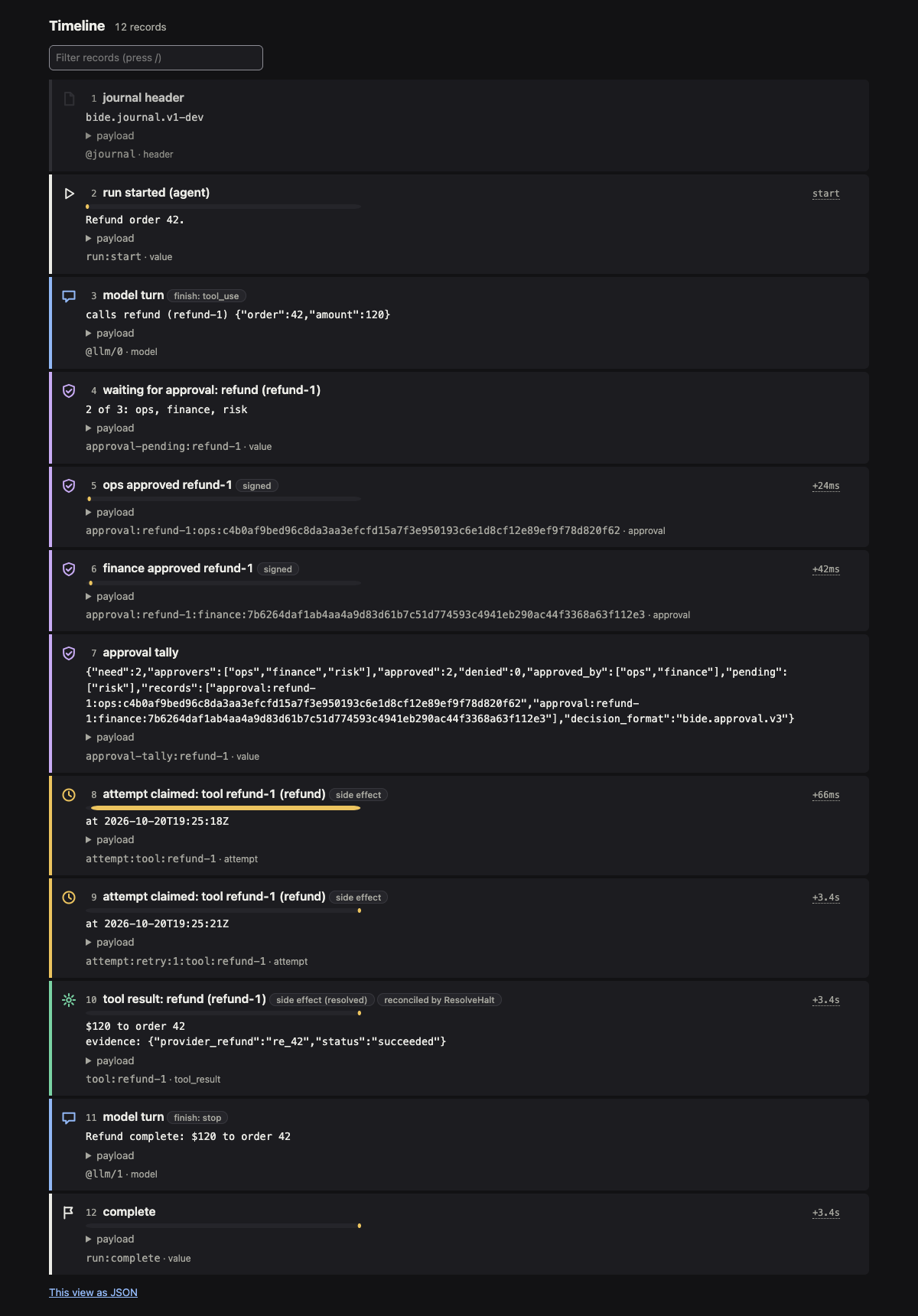
Timeline. Every record in journal order, each with a glyph for its type: the header, run:start (kind, input, tools), model turns (text, tool calls with arguments, finish reason, model), attempt markers and re-attempts, tool results with the Safety they ran under (read-only, idempotent, side effect) and whether ResolveHalt reconciled them (with the evidence), approval decisions, the approval-pending record and tally, plan nodes and Switch choices, and the end marker.
- Each row has an anchor,
#record-N, with a link glyph on hover, so a record can be linked. - Each row's payload is the record as the journal holds it, indented, in a collapsed
detailswith its JSON highlighted (a payload over 8 KiB is cut, and says how much); with JavaScript a Copy button copies it. - The journal timestamps the run's start, its attempt markers, and the records that note when they were written (
recorded_at: a single approver's decision, a signed m-of-n decision, a resultResolveHaltinjected, and the end marker), so only those rows show a time: an offset from the start (+3.2s) with the absolute UTC time on hover, and a bar spanning from that time to the next timestamped record's (for an attempt, an upper bound on how long it had been open, not the operation's duration). Arecorded_atis the writing process's claim, not a signed time, and one that is not in the canonical form places no row. The JSON view carries it on the event (recorded_at) and the run'sended_at.
Theme, keyboard and sharing
Themes. The pages offer
light,darkandhigh-contrast, and start in the one your system asks for (prefers-color-scheme). The sun button in the header (ort) steps to the next theme and names it, and the choice is remembered in the browser's local storage; where storage is blocked it applies to the page only.-theme file.jsonadds a theme of your own to the list (it must pass the checks in the themes guide, and is refused before anything is served if it does not), and-theme-default namesets the theme a reader starts in; a reader's own choice still wins.bide edittakes the same two flags. A theme changes colours, fonts, spacing and corner radius, never a word, an icon or a shape.Keyboard.
jandkmove to the next and previous record (or run, on the list),Enteropens the highlighted run,/goes to the filter (the timeline's, which narrows the rows as you type, or the list's run ID),tswitches the theme,sshares,?shows this list andEsccloses it. The shortcuts are off while you type in a field.Tab icon and title. Each page's title is its verdict and what it is about (
VERIFIED · refund-42 · bide view), and its tab icon is a square in the verdict's color holding its glyph, so a strip of tabs shows which runs need a person.Share this run. On a run page, the button in the verdict (or
s) saves a 1200 by 630 PNG of the verdict, the key numbers, and the flow graph (or the proof path, with the approvers; a run with neither gets its audit proof line instead). The card ends with the project's address. It is drawn in your browser: the page becomes an SVG with its styles written in, the SVG is drawn on a canvas, and the canvas is saved. Nothing is sent anywhere, and the server is not asked for anything.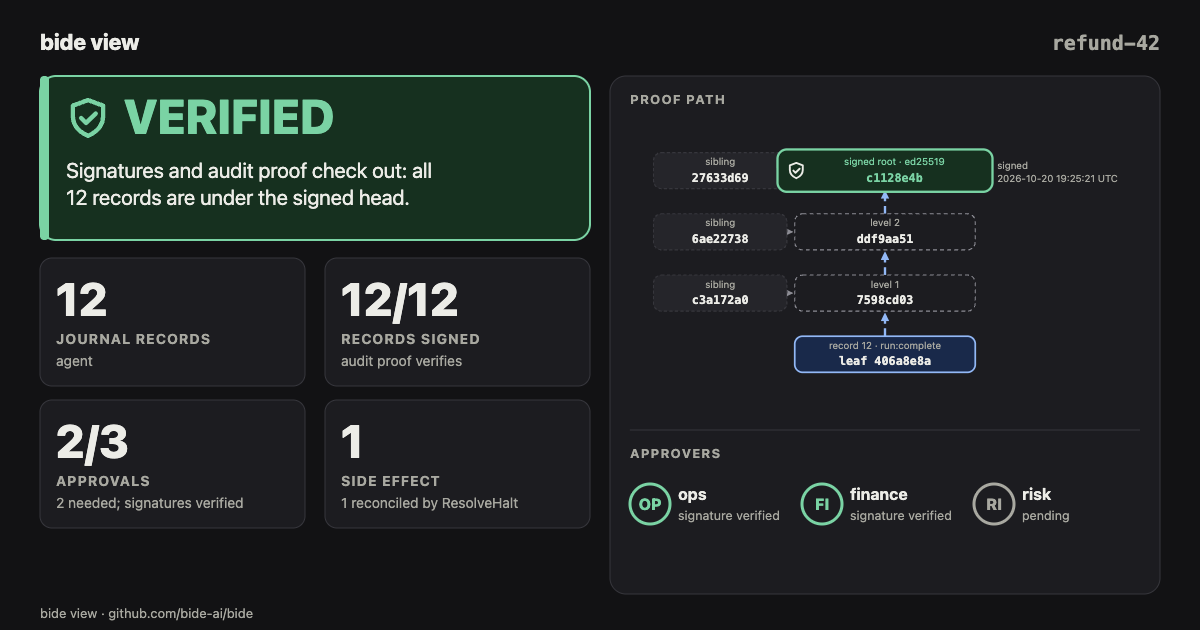
Empty and loading states. A list with no run, a filter that matches nothing and a timeline filter with no match each say so. While a live page fetches new records a thin bar runs along the top of the window.
Follow a run in progress
Open the page of a run that is still going and it follows the run: the timeline rows appear as the records land, and END STATE, the approval gate and its table, and the flow graph change with them (started, then waiting for approval, then completed), with no reload, so the scroll position and any open details stay. A live mark next to the state says the page is following the run, and the rows the last update added are highlighted. Once the run journals its end marker (run:complete, run:aborted or run:cancelled) the page updates a last time and stops: the mark goes away. A halted or waiting run is still followed, since a resume or ResolveHalt adds to it.
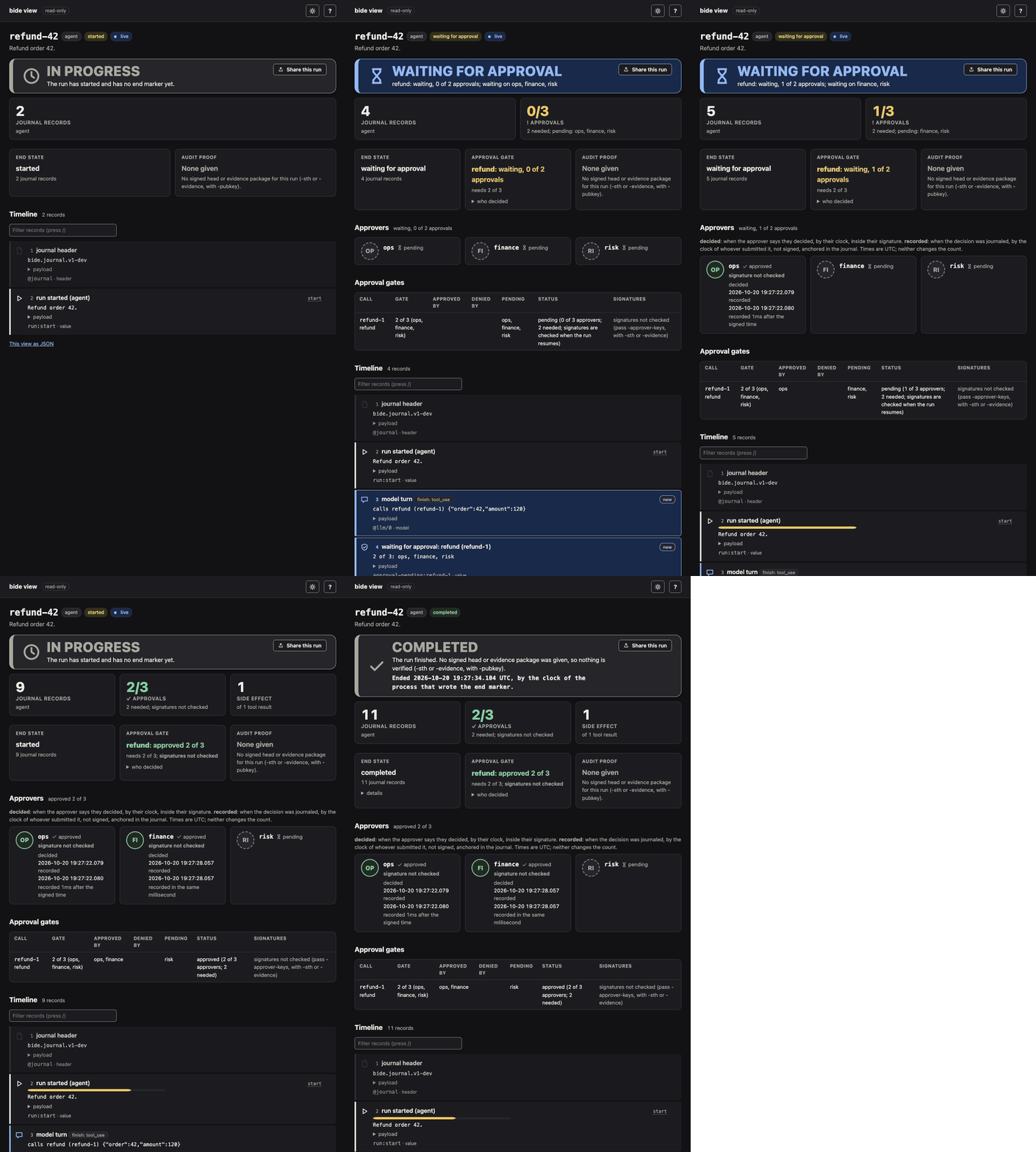
How it works, and what it costs the store:
- The page's script asks
/run/live?id=<run>&after=<cursor>about once a second, where the cursor is the store sequence (agent.Entry.Seq) of the last record the page shows. The viewer answers with oneLoadof the run's entries after the cursor, stopped at the first: no entry, no other read. Only when there is one does it read the run again and answer with the timeline rows of the new records only, the run's state, the next cursor and whether to keep polling ("live": falseonce the run has ended). The page then fetches itself and swaps in its content. - It reads only, as the rest of the viewer does, from SQLite and Postgres alike: the store is opened read-only, and the endpoint answers only GET and HEAD on a loopback address.
- An exported journal (
-journal) does not grow, so its page has no live mark and no live script, and/run/liveis not found. - Without JavaScript the page is the same, complete as of its load, with a link to reload it while the run is in progress. A browser tab in the background does not poll.
To watch one, hold each model turn of the approval example for a few seconds (-turn-delay) and open the page while it runs:
cd examples/approval
go run . run -db a.db -turn-delay 6s &      # in progress for 6 s, then waiting for approval
bide view -db a.db -run refund-42           # open the URL it prints; the page follows the run
go run . approve -db a.db -as ops           # the gate: 1 of 2 approvals
go run . approve -db a.db -as finance
go run . run -db a.db -turn-delay 6s        # the refund runs; 6 s later the run completes
assets/demo/live.sh drives these steps and records the GIF above.
Demo: crash, resolve, verify
examples/approval refunds an order behind a 2-of-3 approval gate, against a SQLite journal. Crash it mid-refund, view the halt, resolve it, and view it again with its evidence verifying:
cd examples/approval
go run . run -db a.db                       # the gate pauses: waiting for approval
bide view -db a.db -run refund-42           # the gate listed, 0 of 3 decided
go run . approve -db a.db -as ops
go run . approve -db a.db -as finance
go run . run -db a.db -crash                # the refund fires; the process dies before its result is journaled
go run . run -db a.db                       # the resume halts: outcome unknown
bide view -db a.db -run refund-42           # the halt, its HaltRef, and the gate approved 2 of 3
go run . resolve -db a.db                   # ResolveHalt from the provider's record, then the run finishes
go run . evidence -db a.db -out ev.json     # prints the log public key; writes approver-keys.json
bide view -db a.db -run refund-42 -evidence ev.json -pubkey <log public key> -approver-keys approver-keys.json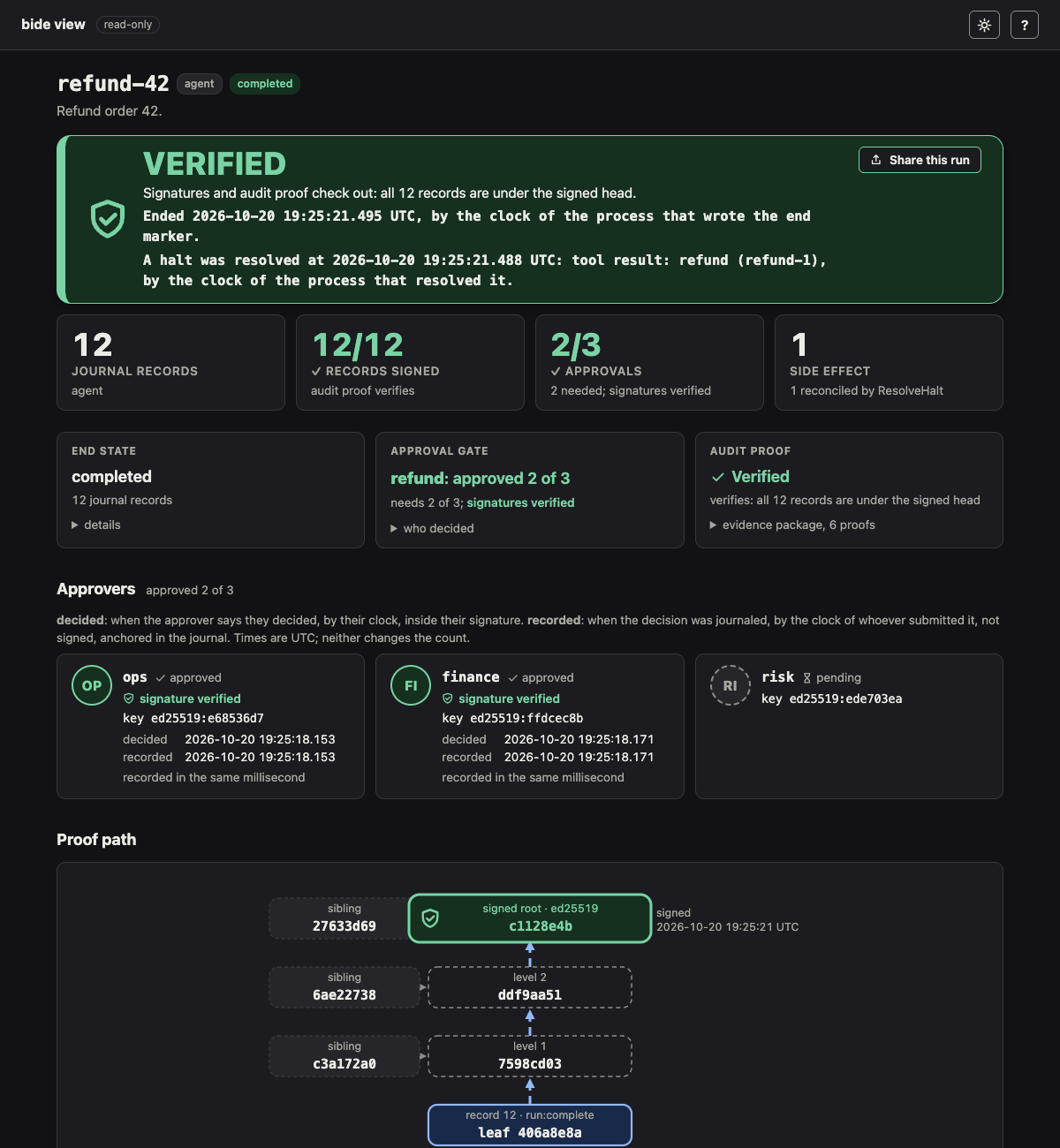
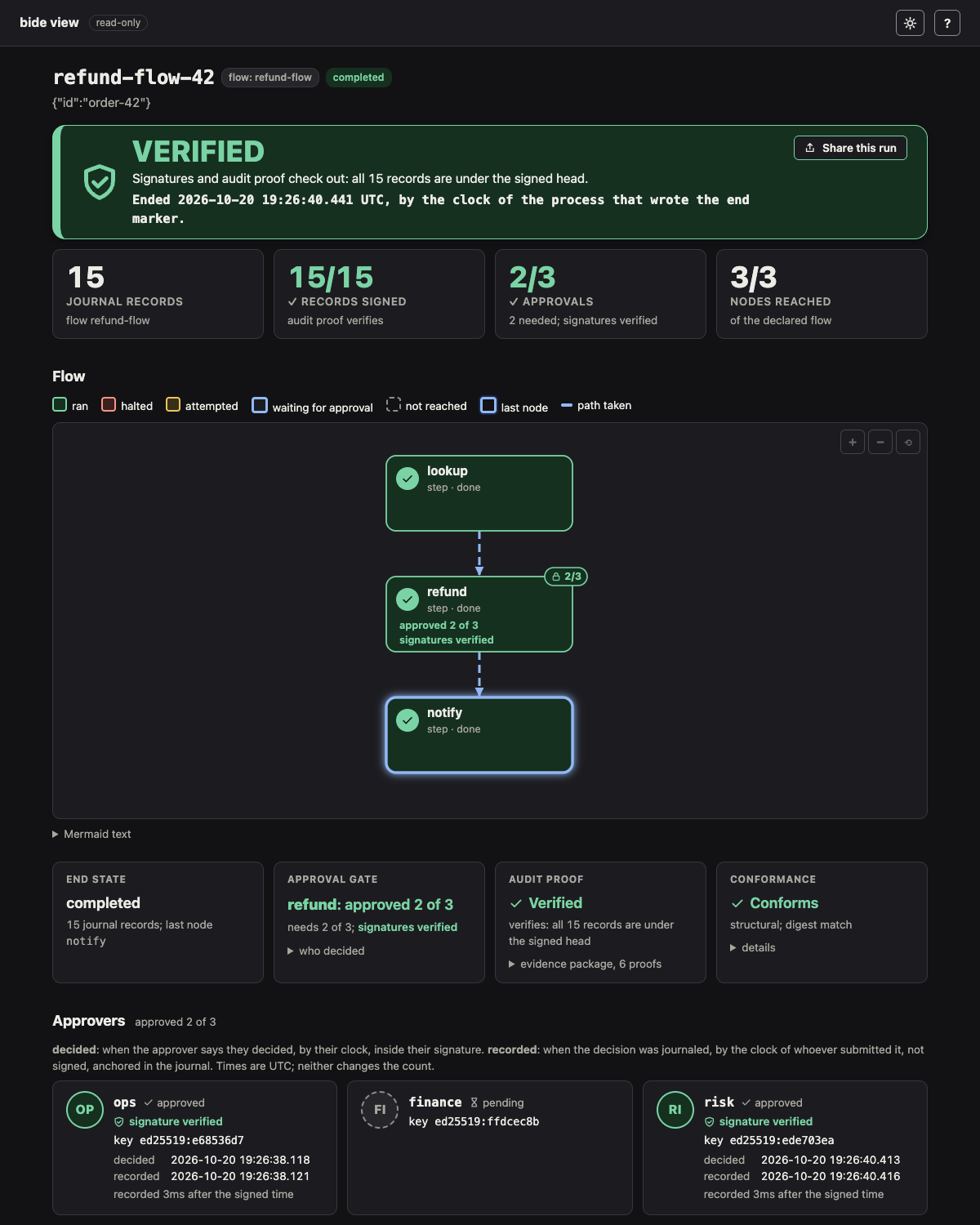
For a gated plan flow node, examples/approval/flow loads a refund flow whose refund node needs 2 of 3 approvers:
cd examples/approval
go run ./flow run -db f.db                  # the flow pauses before refund
go run ./flow approve -db f.db -as ops
go run ./flow run -db f.db                  # still paused: 1 of 2 approvals
bide view -db f.db -run refund-flow-42      # refund waiting at its 2 of 3 gate
go run ./flow approve -db f.db -as risk
go run ./flow run -db f.db                  # the refund runs once; the flow finishes
go run ./flow evidence -db f.db -out fev.json   # prints the log public key; writes approver-keys.json
bide view -db f.db -run refund-flow-42 -evidence fev.json -pubkey <log public key> -approver-keys approver-keys.json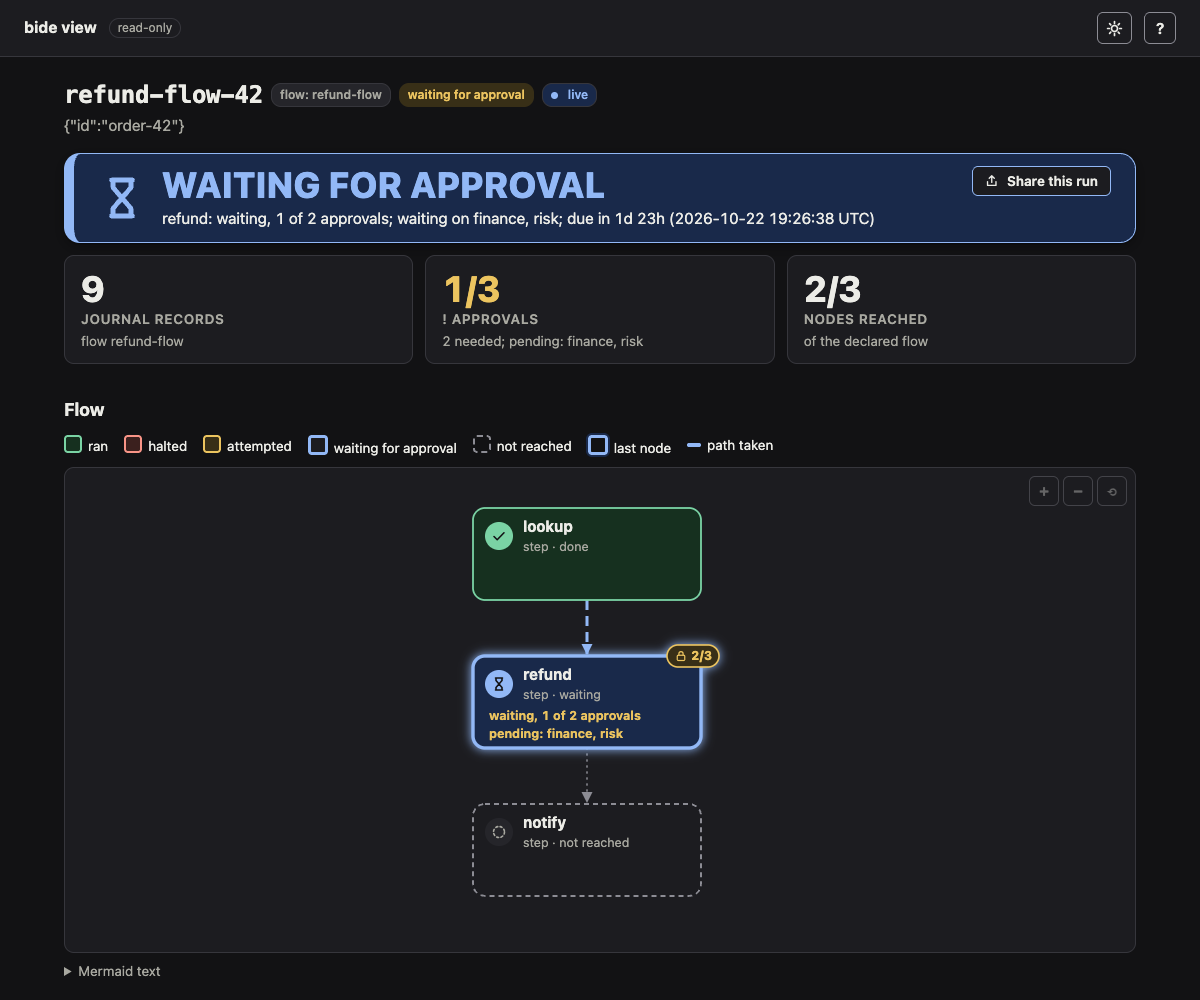
For a plan flow, examples/plan crashes in its reserve step. The run journals its topology, so no flag is needed to draw it:
cd examples/plan
go run . -db f.db -crash during-reserve
go run . -db f.db                                                 # the resume halts at reserve
bide view -db f.db -run triage-demo
Check a flow config
bide edit flow.yaml shows the same check in a page with an outline and an inspector; see the flow editor guide.
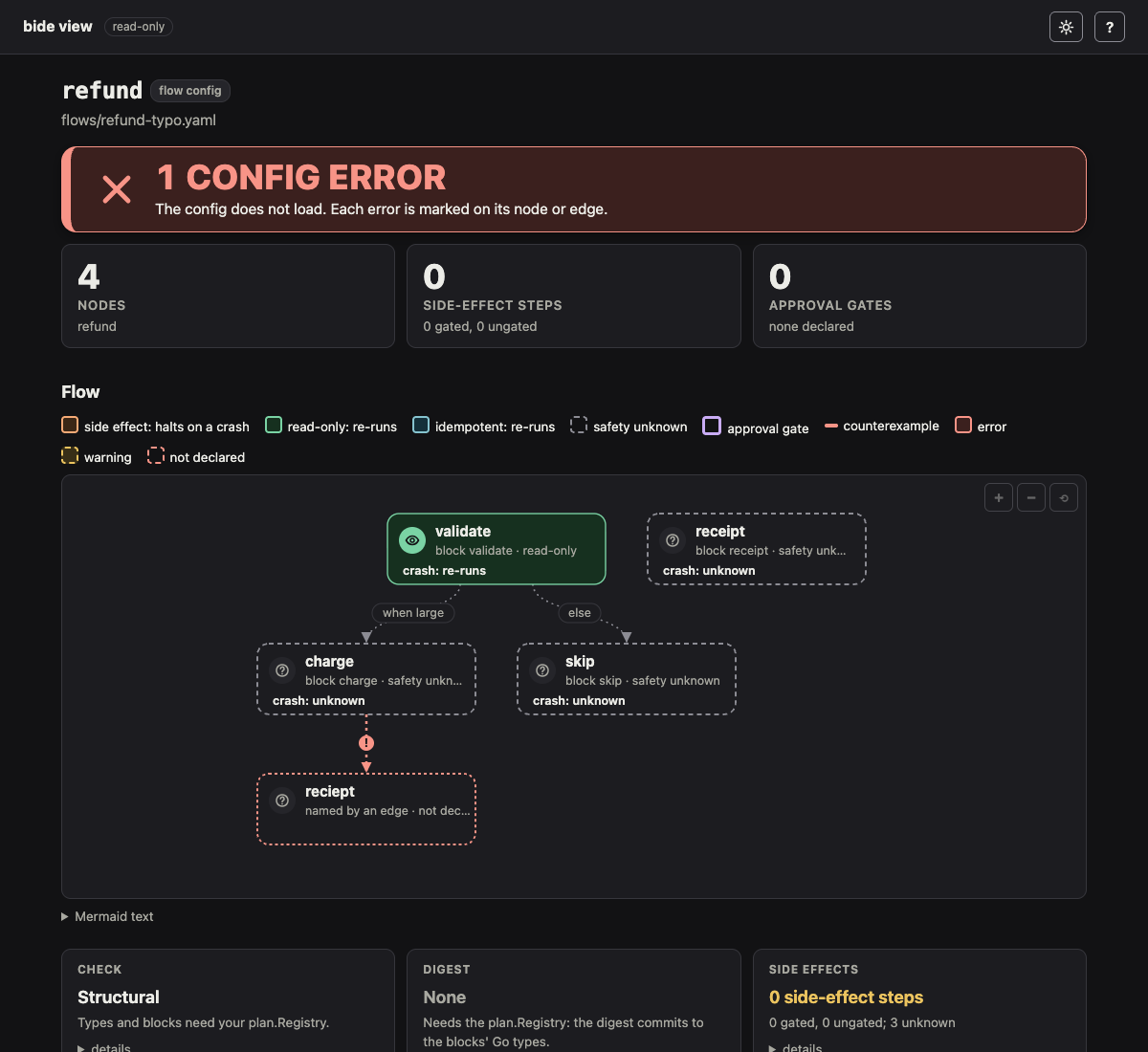
bide view -config shows a flow definition (a plan config, .json or .yaml) without running anything: the declared graph, its Switch arms and loops, each node's approval gate written as 2 of 3: ops, finance, risk with excluding the requester (separation of duties) and times out after 24h when the block sets exclude_principal or timeout (the box says gated: 2 of 3 · SoD · 24h, the Mermaid text and the tooltip say it in full), and every problem plan.InspectConfig finds, marked on the node, edge or arm it belongs to, with the full message in the Problems table and in each mark's tooltip. An edge to a name no node declares draws that name as a dashed "not declared" node.
cd examples/plan
bide view -config flows/refund.yaml                 # the page; no problems
bide check flows/refund-typo.yaml                   # for CI: no server, one line per problem
The screenshot below is examples/plan/flows/refund-typo.yaml, whose last edge names reciept.
Check against a description of the registered blocks
Without the program, bide check knows block names only from the config, so it cannot check types and cannot see a gate a block declares in Go. bide check -blocks blocks.json flow.yaml (and bide view -config ... -blocks) takes a description of the program's plan.Registry and runs the same checks Load makes, by type name: unknown blocks, predicates and merges, the type along every edge, join arity, safety, the gates the blocks declare, and the digest a run would journal. A program writes the file once:
b, _ := json.MarshalIndent(reg.Describe(), "", "  ")
os.WriteFile("blocks.json", b, 0o600)
The result is labelled checked per description file, not checked against the program in the text, the page and the diff, because a description is a file: it can be stale, or wrong. The check made with the program's own Registry (plan/planview) is the control; this one makes the same answer available in a pipeline that does not build the program. Types are told apart by name, so two distinct types spelled the same are one type (known limitations). A block the description holds and the config does not use is not reported (a description is of the whole program, and a flow uses some of it; Load would refuse such a block in a program that registers only one flow). A description whose program's Registry refused a registration (a duplicate, a gate Validate refuses) is refused, with the registry's error. The file is read once, must be a regular file of at most 1 MiB (a named pipe or a device is refused without waiting on it) with no unknown field, and is validated before it is used; it may nest at most 32 levels (a description nests five), and an error about its contents is cut to 200 bytes.
With -diff, -blocks describes the config and -old-blocks the earlier version, as the program's blocks were then (a block the old config uses must be in the old description). A description is never applied to the other side, and a described side is never compared with one that has none (the described side knows each node's safety and the gates its blocks declare, the other states only what its config states, and that difference would read as a lowering): with one description the comparison is the structural one, labelled with which side was described. Give both to compare what the program declared at each version. A block swapped for one that declares no gate is then reported as a weakening, which from the command line alone is only a possible one.
Adding a description never makes -diff less strict than leaving it out, unless the description is wrong or stale (it is only as good as the file). If a side has errors against the description (a block the description lacks, a type that does not fit), the typed comparison has nothing sound to read, so the diff is made structurally, as without the description, and is labelled not certified: the verdict is never good and -fail-on-weaken fails, whether or not a weakening was found. Every result says how each side was checked (old config per description file, new config structural), including when only -old-blocks is given.
A verdict that rests on description files says so, and names the files by their SHA-256 (what sha256sum prints), the earlier one and this one, so a reviewer can tell which files were used. Because the result is only as good as the files, generate both in the same CI job from the two versions of the program, never edit them by hand: build the program at the base revision and at the head, have each write json.Marshal(reg.Describe()), and give those two files to bide check. A description that was written for another version, or edited, makes the verdict wrong, and nothing in the file can say so.
# in CI, after writing blocks-main.json from the base revision's program and blocks.json from the head's
bide check flows/refund-v2.yaml -diff main -blocks blocks.json -old-blocks blocks-main.json -check -fail-on-weaken
sha256sum blocks.json blocks-main.json   # the two lines the verdict names
Risk map
Each node is colored by what a crash does to it, the property that decides whether a resume is safe:
| Color | Class | On a crash mid-node |
|---|---|---|
| orange | side effect: must not run twice | the resume halts (*agent.OutcomeUnknown) and asks for the outcome |
| green | read-only: no external effect | the resume re-runs it |
| blue | idempotent: safe to repeat | the resume re-runs it |
| dashed | safety unknown | not known |
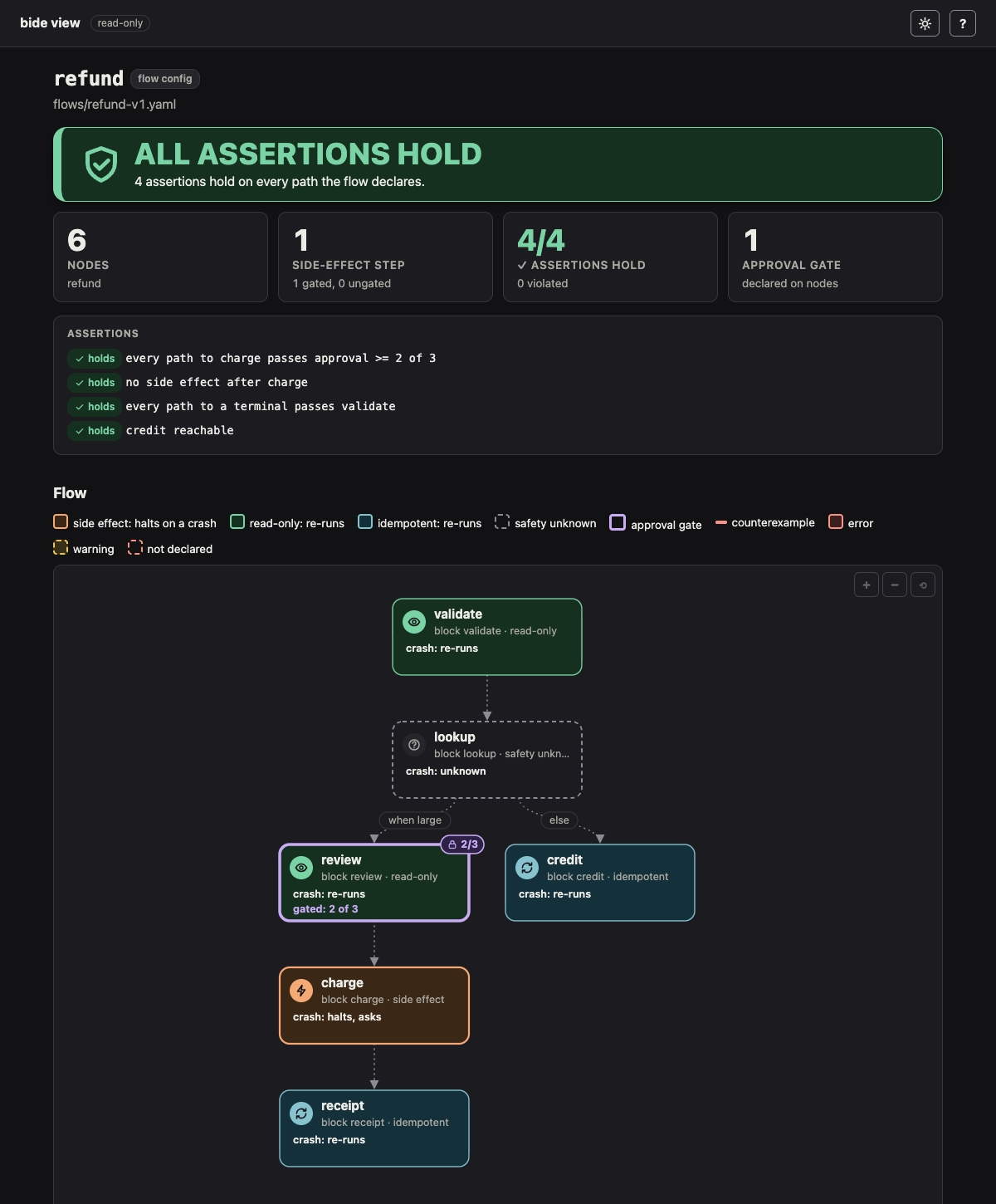
Each class has its own glyph as well as its color (a bolt, an eye, a loop, a question mark). A node with an approval gate has a purple border, a 2/3 badge on its corner and a gated: 2 of 3 line. Each node's tooltip says its class, what a crash does, and, for a side effect, whether every path to it passes an approval gate. The Side effects card sums it up: "1 side-effect step, 1 gated, 0 ungated", where a gated side effect is one every path from the entry to which passes a gate (its own or an earlier node's). From the command line a class is known only where the config states safety, since the block's registered Safety is Go code; the card then says how many nodes are "safety unknown without the Registry" and counts only the known side effects. With your Registry (plan/planview) every class is exact, a config's lowering included: a Model node, for example, is read-only unless its config says safety: side_effect.
Policy assertions
A config's assert list (see Policy assertions for the grammar) is decided on the graph. The Assertions card lists each verdict (holds, violated, undecided or invalid), and a violated assertion's counterexample, a shortest path from the entry, is drawn in red on the graph. examples/plan/flows/refund-policy.yaml routes a large refund through review, a 2-of-3 gate, to charge, and all four of its assertions hold:
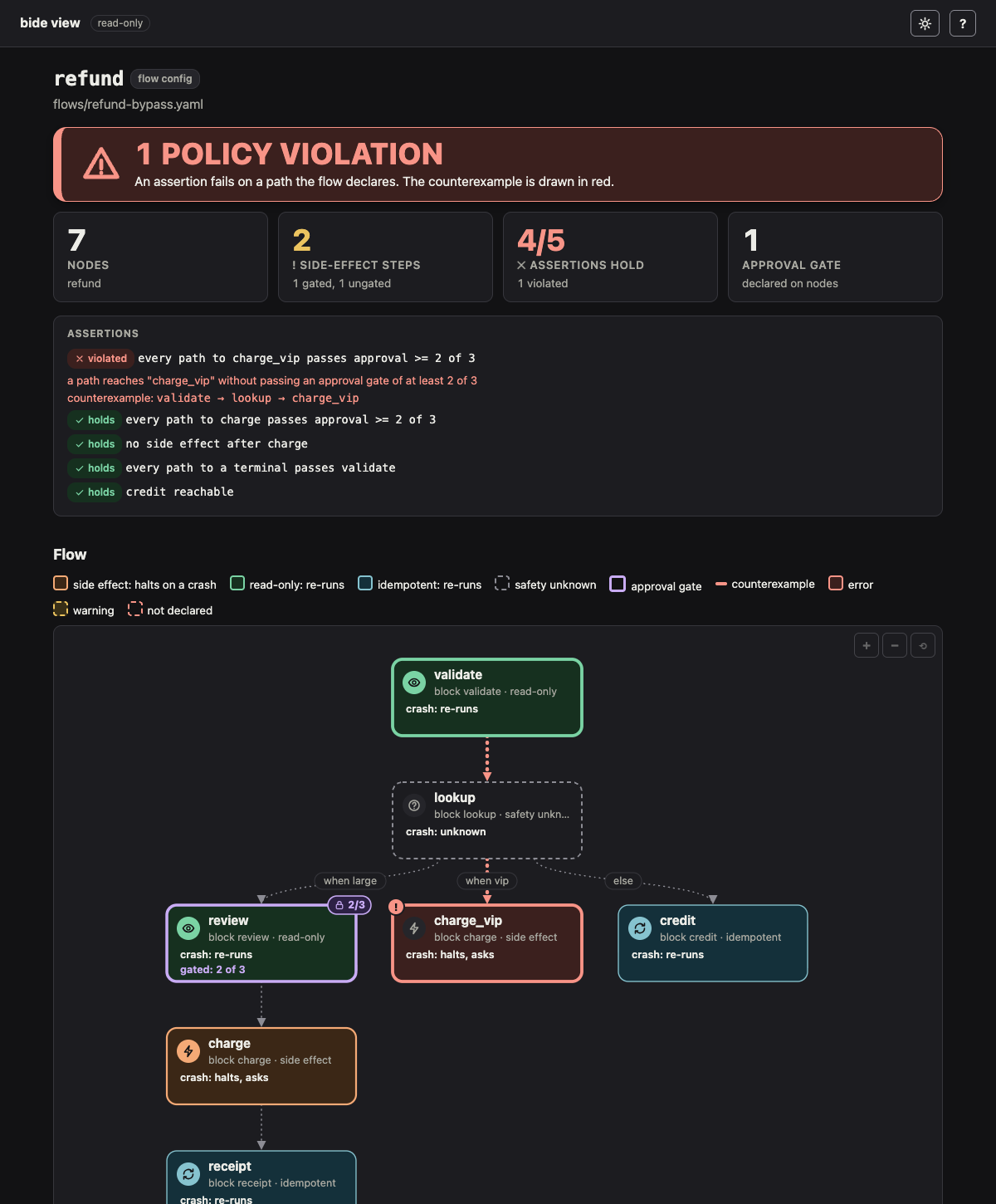
refund-policy-bypass.yaml adds a vip arm from lookup straight to charge_vip, a second charge step with no gate. (A route around a gate to the same step would feed it from two producers, which plan.Load refuses: a step with several producers needs a join. So a bypass is a second step that does the same work.) The assertion every path to charge_vip passes approval >= 2 of 3 is violated, and its counterexample, validate -> lookup -> charge_vip, is drawn in red:
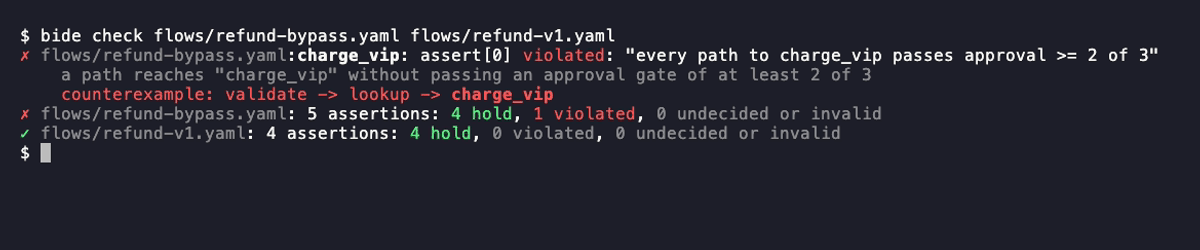
bide check fails on it and prints it as a line, then counts the verdicts:
flows/refund-policy-bypass.yaml:charge_vip: assert[0] "every path to charge_vip passes approval >= 2 of 3" is violated: a path reaches "charge_vip" without passing an approval gate of at least 2 of 3 (counterexample: validate -> lookup -> charge_vip)
flows/refund-policy-bypass.yaml: 5 assertions: 4 hold, 1 violated, 0 undecided or invalid
On a terminal the violation is split over lines that fit the terminal: a red ✗ and the assertion, then the reason, dimmed, then the counterexample path in red with the node it reaches in bold; a file whose assertions all hold gets a green ✓ (see Color). Piped or redirected, it is the one line above:
An undecided assertion (a node of unknown safety after X, in no side effect after X), an assertion outside the grammar, and one naming an undeclared node are errors as well.
bide check (or bide view -config <file> -check) prints file:node: message for a node's problem, file:from->to: message for an edge's or an arm's, and file: message for the config as a whole, and exits 1 if any is an error (0 otherwise; a warning is printed as warning: and does not fail the check unless you add -strict; an unreadable file exits 1, a usage error 2). A violated, undecided or invalid assertion is an error. bide check takes several files and exits 1 if any of them fails.
Structural, from the command line. The command cannot import your Go types, blocks or tools, so it checks what needs no Go code: the config reads as plan.Load reads it (strictly, version 1); node names are unique; each wiring element is one edge, switch or join; every edge, arm, else, join input and the entry name a declared node; every safety is known; and every approval block is a valid policy (a valid one is drawn on its node). A switch with no else is a warning: a value no arm matches fails the run. The page says "structural check", and shows no digest, which commits to the blocks' types.
Full, from your program. Package plan/planview serves the same page with your *plan.Registry, so the check is plan.Load's own: unregistered blocks, predicates and merges (with near-miss suggestions), edge and arm types, and the whole-graph checks, with In and Out taken from the entry and terminal nodes. The page then shows the digest a run of the flow journals.
ln, err := planview.Listen("127.0.0.1:8485")
if err != nil {
	log.Fatal(err)
}
log.Fatal(http.Serve(ln, planview.Handler("refund.json", config, reg)))
// or, in CI: if planview.Check(os.Stdout, "refund.json", config, reg) { os.Exit(1) }
Compare two versions of a flow
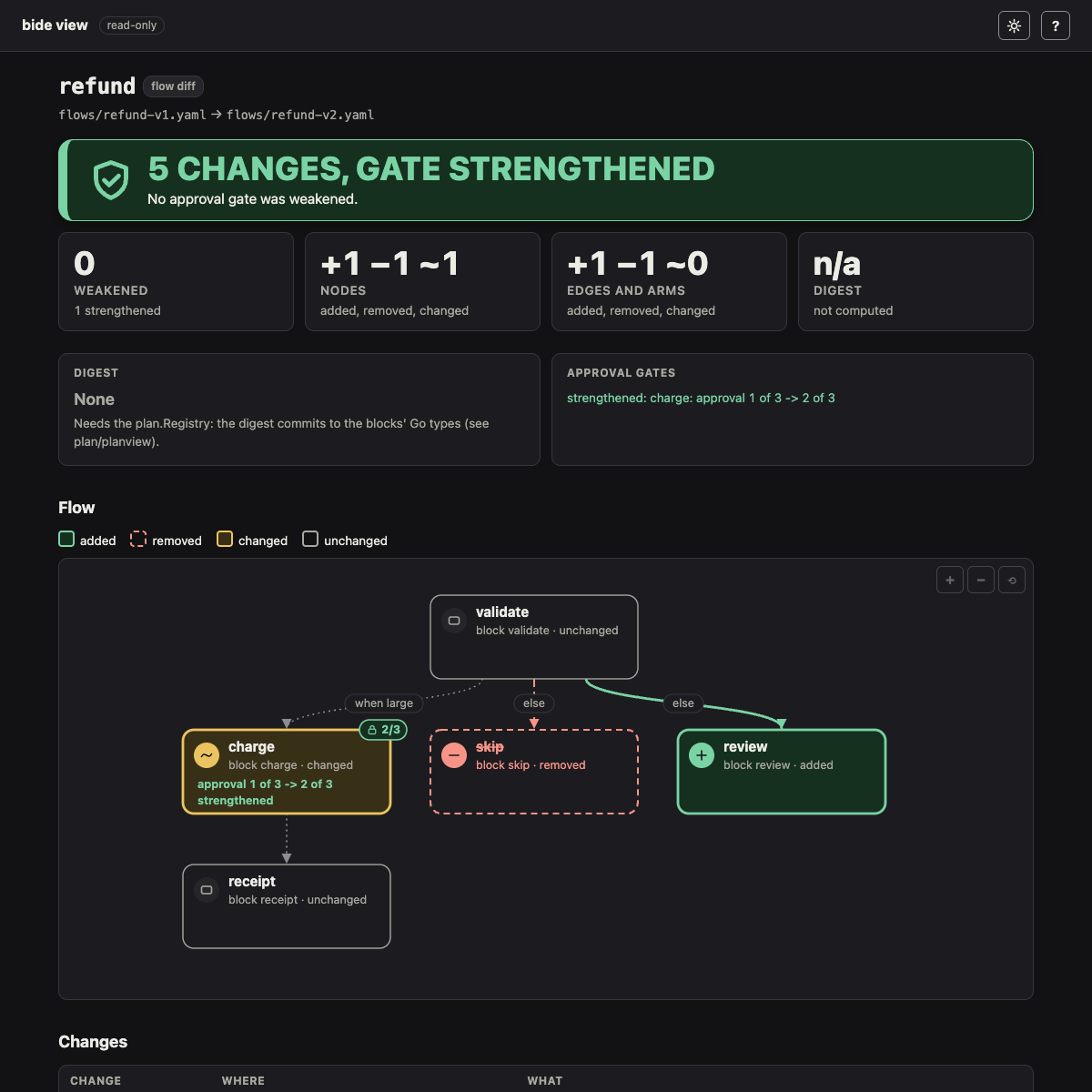
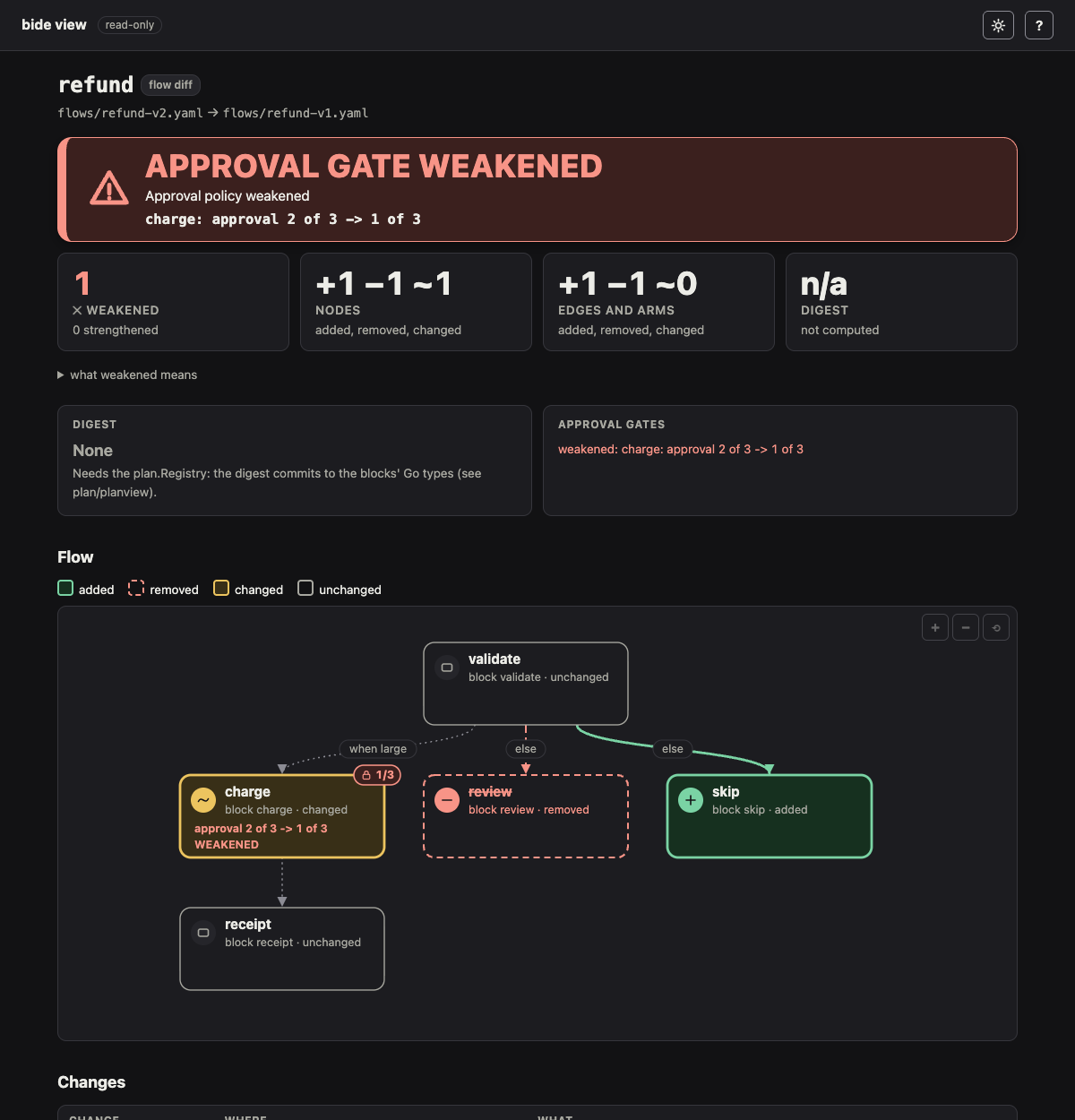
bide check <file> -diff <old> compares a flow config with an earlier version of it, for review before a change ships. It serves a read-only page (as bide view does, on -addr) that draws the new flow with added nodes and edges in green (a solid edge), removed ones as dashed red ghosts where they were, and changed nodes in amber with what changed (a changed edge is dash-dot): the block, the safety, or the approval gate (approval 1 of 3 -> 2 of 3, strengthened or weakened; its approvers, exclude_principal and timeout are compared too). A summary card counts the changes and gives the digest before and after, and a weakened approval policy is the verdict, APPROVAL GATE WEAKENED, above everything else. bide view -config <file> -diff <old> is the same page.
cd examples/plan
bide check flows/refund-v2.yaml -diff flows/refund-v1.yaml            # the page
bide check flows/refund-v2.yaml -diff main                            # against the file on main
bide check flows/refund-v2.yaml -diff HEAD~1:examples/plan/flows/refund-v2.yaml
bide check flows/refund-v1.yaml -diff flows/refund-v2.yaml -check -fail-on-weaken   # for CI
examples/plan/flows/refund-v2.yaml sends small refunds to a review step instead of skipping them and raises the refund approval from 1 of 3 to 2 of 3:
The reverse comparison lowers the gate, so the page leads with the weakened policy:
Where -diff reads the old version. When a file has that name, it is the file. Otherwise the argument is a git revision, read with git show from the working directory: <rev>:<path> is git's own form (the path from the top of the repository, or from the working directory when it starts with ./), and a bare <rev> (main, HEAD~1) means the config's own path at that revision. The extension of the path picks YAML or JSON. A file named like a revision wins; write ./main or main:<path> to be explicit.
Text, for CI. With -check it serves nothing and prints one line per change, a line per weakened gate and a summary, each prefixed with the new file's name:
flows/refund-v1.yaml: changed node charge: approval 2 of 3 -> 1 of 3 (weakened)
flows/refund-v1.yaml: added node skip: block skip; safety readonly
flows/refund-v1.yaml: removed node review: block review
flows/refund-v1.yaml: added edge validate -> skip: else
flows/refund-v1.yaml: removed edge validate -> review: else
flows/refund-v1.yaml: approval policy weakened: charge: approval 2 of 3 -> 1 of 3
flows/refund-v1.yaml: 5 changes from flows/refund-v2.yaml (nodes: 1 added, 1 removed, 1 changed; edges: 1 added, 1 removed, 0 changed); digest not computed: the check is structural (the digest commits to the blocks' Go types; see plan/planview)
On a terminal the lines are colored as the page is (added green, removed red, changed amber), the weakened gate moves to the top, in bold red, and the summary's counts and digest go on lines of their own:

A diff is not a failure: it exits 0, unless -fail-on-weaken finds a weakened gate (exit 1). An old or new version that cannot be read as a flow config exits 1; a version with config errors is compared as far as it reads, with a note (bide check <file> lists the errors). -diff compares; it does not check, so -strict is a usage error with it.
What counts as weakened. A gate is weakened when some set of approvals the new gate accepts would not have passed the old one: the gate was removed (a removed gated node counts, so renaming a gated node reads as removing its gate), its need was lowered, an approver was added without raising the need to match, an approver was replaced, exclude_principal was dropped, or its timeout was removed or lengthened (approval 2 of 3, times out after 24h -> 2 of 3, no timeout (weakened): a run can now wait longer, and a decision recorded after the old deadline now counts). Adding a timeout or shortening one is a strengthening: the gate fails closed sooner. A change in two directions (a higher need with the timeout removed) is not strictly stronger, so it is called weakened. Precisely, need k of approvers A becomes need k' of approvers B, and the change is weakened unless k' minus the number of approvers in B and not in A is at least k. The reverse is strengthened; the same approvers and need in another policy order is reordered.
Two more kinds of change are weakenings, reported with the gate changes (-fail-on-weaken exits 1 on them too, and the page's verdict reads SAFETY CHECK WEAKENED when no gate policy itself was weakened):
- A node newly reachable without a gate. A node that every path from the entry reached through an approval gate before (
ConfigReport.Gated, and reachable at all), and that some path now reaches without one, is reported whatever itssafety: read-only and idempotent nodes count, because thesafetylabel is the new config's own claim and an edit can relabel a node and route around its gate together. The report names the node, its safety and the shortest ungated path:receipt: reachable without an approval gate (validate -> receipt), not before; its safety is side effect. That covers a new arm or edge around a gate and a gate removed upstream. Two cases have no earlier gate to lose and are judged by whether the node may have an effect (itssafetyisside_effect, or is not known: a config checked without itsplan.Registrydoes not state it), in either config: a node that is new (new node, reachable without ...), and one the entry did not reach before; and a node already reached without a gate is reported when itssafetyis raised toside_effector dropped. A new read-only or idempotent node, one already reachable ungated, one behind a gate, and one the entry cannot reach are not reported. A new node with the same block and kind as a removed one is judged against that one as well (it may be the same node, rewired and renamed), so a gated node replaced by an ungated read-only copy is reported. A new node that uses a block every node used only behind a gate before, and that is reachable without one, is reported whatever its name andsafety(its block charge was reached only through an approval gate before (charge)), a read-only block included, and so is an existing node edited in place onto such a block. Raising thesafetyof a node that was already reachable without a gate (read-only to side effect) is reported as well: it is an effect that is newly ungated. - A safety lowered. A node whose
safetymoved toward read-only (side effect or unknown to idempotent or read-only, idempotent to read-only) is reported assafety lowered side effect -> read-only, on its own and also when it is reachable ungated, since every effect check trusts the label. Raising asafetyis not a weakening by itself. - A rename. A removed node and an added node with the same block and kind, and the same edges and Switch arms (under the new names), are one node, listed as
renamed; a gate that changed with the rename is reported on it (renamed node pay: was charge; approval 2 of 3 -> 1 of 3 (weakened)), and so are a lowered safety and a gate removed upstream. One that also changes the block or edges is judged on those changes (a renamed node whose route changed is reported). - A Switch condition changed beside an ungated effect. The check cannot read a predicate, so it cannot tell which inputs now take which arm. When a Switch gains, loses or changes an arm condition and another arm of it leads, without a gate, to an effect (a node reported above as possibly having one), it reports
arm conditions changed (...) while another arm reaches an ungated effect (small): review which inputs take which arm, as a weakening. It is conservative: it asks for a review and does not say the change is wrong, and it fires on a condition edit even when the ungated arm was there before. A node's old safety counts as well as its new, so relabeling the other arm's effect read-only does not silence it. - A block changed without the Registry. Without a
plan.Registry(the command-line check) a block's own approval gate (ToolSpec.Approval, set in Go) is not visible, so a block changed on an effect node that no gate in the config guards is reported as weakened: the new block may have no gate. With the Registry the gate is seen and the change is judged by what shows. - An
assertline removed or loosened. A line the new config lacks is reported as removed, unless a different line for the same node replaces it:every path to T passes approval >= K [of N] [excluding the requester]is loosened by a lower K, a larger N (or an N where there was none), or droppingexcluding the requester, and tightened by the reverse (a strengthening). Other assertion forms are compared by their text (spacing and the quoting of a node name aside): a line that changed is a removal of the old line and an added line. A new line that matches none removed is listed as added, not as a weakening. - An
assertline kept and no longer holding. A line the new config keeps as it was (spacing and quoting aside, in every assertion form) that held in the old config and is now violated, cannot be decided, or no longer reads (it names a node the new config dropped) is reported as weakened, with the counterexample path when there is one:assertion no longer holds: every path to a terminal passes charge (violated, counterexample: validate -> audit). So is a line that held and now holds only vacuously, because nothing it is about is reachable (a new edge made the flow cyclic, so it has no terminal, or the path to the node is gone):assertion now holds only vacuously: every path to a terminal passes charge (no path from the entry reaches a node this assertion is about). A line that did not hold before, or was already vacuous, is not reported;bide checkalready lists a violation. A line written twice is one assertion. A line that names a node the diff pairs as renamed (the same block, kind and edges under the new name) follows the node: renaming a node and its line together is not a removed assertion, and the line is still decided under the new name. When the rename is not certain (the node's edges changed too) the line reads as removed and added, which is the conservative report.
The check still does not read predicates (above), does not reason about nodes that are not effects, and compares assert lines as written, apart from a kept line that stopped holding (above). An effect node's safety comes from the config, or the Registry; a node whose safety the config leaves out is treated as an effect, so state safety: readonly where it holds to keep a read-only step from being reported.
The digest. From the command line the comparison is structural, as bide check is, so it shows no digest. Package plan/planview serves the same page (DiffHandler) and text (CheckDiff) with a plan.Registry for each version, and then shows the digest each version's runs journal: a changed digest means a run paused under the old flow will not resume under the new one. plan.Load refuses a block registered and never used, so each version takes the Registry the program had at that version. A side that has errors against its Registry (a block it lacks or does not use) has no gates the comparison can read, so the diff is then made structurally, as without a Registry, and is reported as not certified: CheckDiff reports it like a weakening, so -fail-on-weaken fails on it.
weakened, err := planview.CheckDiff(os.Stdout,
	planview.Version{Name: "main:refund.json", Data: old, Registry: oldReg},
	planview.Version{Name: "refund.json", Data: cfg, Registry: reg})
if err != nil || weakened {
	os.Exit(1)
}
A GitHub Action that posts the -check text as a pull request comment is a planned follow-up; until then, a workflow step can run the command and post its output.
Color
bide check, bide view, bide demo, bide init and bide audit color their text output when it goes to a terminal: green and a ✓ for what passed, red and a ✗ for what failed, amber for a warning, a halt or an approval gate, bold cyan for an address or a command to run next, and dim for detail such as a digest. The words are the same with or without color, so nothing is told by color alone.
Output to a file or a pipe, as in CI, is the plain text shown above, byte for byte. Each of these commands takes -color=auto|always|never (default auto). auto colors only a terminal, and not when NO_COLOR is set to any value or TERM is dumb; on Windows it colors only a terminal known to read ANSI escapes (Windows Terminal, ConEmu, ANSICON, VS Code, or a TERM such as xterm-256color). -color=always colors even a pipe (for a log viewer that renders ANSI), and overrides NO_COLOR. Help (-h) is plain.
An error on stderr opens with a bold red error: on a terminal (bide: unknown command "x" reads error: bide: unknown command "x"), and a "what to do next" hint the message carries after a semicolon is dim; piped, the line is the one it always was. The command list (bide, bide help) has bold headings and command names and dim summaries, and bide version is lightly styled; the flag help of a command (bide <command> -h) stays plain.
The project bide init writes colors its own output the same way, from a small color.go it holds (a terminal only, off with NO_COLOR or TERM=dumb; delete it and make tag return its word if you want none), and so do the examples/approval and examples/stripe-refund programs, each with a copy of that helper, since an example is its own module and cannot import bide's.
What it cannot show
- A flow run started before
flow:topologywas journaled has only its digest, so pass its topology with-topology(JSON offlow.Topology(), whichexamples/plan -topology-outwrites) to draw it. - Proof needs
-sthor-evidence. Anaudit.AuditedStorepublishes its signed heads to an external anchor, not to the store, so the viewer verifies only a head or package you give it. - A halted call's
Safetyis not journaled. Only a result records it. A halted call has an attempt marker, which the engine writes only for a side effect, so the page shows it as one. - A paused run journaled by an earlier release has no
approval-pending:record, so its gate is listed only once a decision is recorded.