
Flow editor: bide edit
bide edit flow.yaml opens a local page for one flow config: its declared graph, an outline of its nodes and wiring, each node's approval gate and safety, the assertions and their verdicts, the problems bide check finds, and the source. The design is in docs/design/visual-editor.md; this page says what the command does today.
You can edit a node's approval gate, safety and block with forms, or edit the file's source, see what bide check says about it as you type, see whether the edit weakens the flow, and save. The forms mean a policy owner need not write YAML, and an assertion is built from a template and shows its verdict before it is added.
The editor is an authoring tool and nothing else. It reads and writes the file plan.Load reads, adds no key to it, starts no run and holds no state of its own: the run is the run plan already makes. A flow is checked by the code bide check runs, in Go; the page holds the text and draws what the server computes.
bide edit flow.yaml
# bide edit: serving http://127.0.0.1:8585/#t=3f9a... (loopback only; Ctrl-C to stop)
Open the whole address, including the part after #: it is a random session token the page sends with every request, and it is not sent to the server as part of the address or in a Referer.
What it does and does not do
The first phase of the editor (the accountability editor) is complete as designed: the read-only views, the baseline and the weakened banner, the source pane with a diff and an atomic save, the forms for a node's safety, block and approval gate, the assertions panel, and the accessibility work below. The second phase (structure) is built (v0.22.0): you can add, remove and rename a node, write the entry (see Nodes), reorder nodes and wiring elements, and set the flow's name and types (see Order, wiring order and the flow's settings), and wire edges, switches, arms and else (see Connections), set an arm's loop bound, and add, change and remove joins (see Joins and loops), and, when it knows your program's blocks, list them with their types, check connections against them and show the digest (see Typed mode). It can compare the file with the topology a run journaled (v0.25.0; see Compare with a run). It does not let you place nodes on the canvas (the layout is derived from the topology, on purpose). A config with an anchor or alias anywhere, a repeated key, a key that is not a string, NaN or infinity, or mixed line ends is refused by the editor with the reason (edit it in a text editor); plan itself accepts an anchor or alias, and refuses the others too. The design note (visual-editor.md) has the later phases.
What the page shows
- The verdict, in the words
bide view -configuses (ALL ASSERTIONS HOLD,1 POLICY VIOLATION,2 CONFIG ERRORS,CONFIG DOES NOT PARSE), with a glyph beside the word: a state is never carried by color alone. Under it the page says structural check only: blocks and types are checked when a program loads the flow. From the command line a block's own gate and safety, declared in Go, are not visible, so a clean verdict here is notLoadaccepting the flow (see Check a flow config). - The flow: the same layered drawing
bide view -configdraws, with each node's crash behavior, its gate badge (2/3) and the problems marked on the node or edge they belong to. The layout is derived from the topology, not stored: the config has no place for coordinates, so the picture is the one a reviewer sees onbide check -diff. - The outline: the nodes in the order the config declares them, then the wiring. Order is data (the topology digest commits to node, edge and arm order), so the outline is a list in config order, not a sorted one.
- The inspector: the selected node's crash behavior, its approval gate and its problems, and the forms below (see The inspector's forms). Select a node by clicking it in the flow, or with the keyboard in the outline or the flow (Tab to it, Enter).
- The assertions, each with its verdict and, for a violated one, the counterexample path. They are checked by
bide checkand in CI, not at run time:plan.Loadignoresassertlines. - The problems
bide checklists, and the source as the file is on disk.
The inspector's forms
Select a node and the inspector offers three forms. Each change is an operation the server applies to the file's text as a splice, so the diff of an edit is the edit: the file's comments, blank lines, key order and the flow or block style of the lines around it stay as they were. The result is verified before it is returned (the text must parse to the old data with the operation applied and nothing else, every other line unchanged, every comment still with its entry); an operation the engine cannot splice safely (a file with anchors or aliases on that node, more than one document, CRLF line ends, a byte-order mark) is refused with the reason and the text is untouched, and you edit that part in the source.
- Safety:
readonly,idempotentorside_effect, or left to the block. The config may only lower the safety a block declares in Go, never raise it; the editor cannot see the block's, so a value above it fails when a program loads the flow, and the form says so. - Block: the name of a registered block. You choose one (the names used in the file are offered); a block's Go code is not written here.
- Approval gate: decisions needed, the approvers in policy order, separation of duties (never count the person who started the run) and a deadline (
timeout, a Go duration such as48h: past it the gate expires and the node never runs). The form edits a draft. Every change to the draft asks the server whatbide checkwould say of the node with that gate and shows the answer under the form, in the check's words (approval.need 9 must be between 1 and 4, or anassertline the draft would break), so the form rejects exactly what the check rejects and there is no second validator in the page. Apply gate writes the draft into the text; Remove gate removes it. The page says that approvers' keys are supplied when a program loads the flow and that it cannot check that they are enrolled.
A form change is an undoable step (the history keeps the last 100 steps; each is a whole copy of the text): Undo and Redo in the header restore the exact earlier text, and a burst of typing in the source is one step. After a change the focus returns to the control you changed. A changed gate, safety or block is compared with the baseline like any other edit, so the weakened banner appears when the change weakens the flow, with the same words as in CI.
Undo and Redo cover every kind of edit, structure included. A node added, renamed, moved or removed, an edge, a switch, an arm, a loop bound, a join, the flow's name and a gate removed are each one step; Undo walks back to the file's exact text one step at a time and Redo forward again. The history holds whole texts, and for each one the server computes the check, the weakened banner and the diff again, so the page never shows a verdict from an older text. The history is kept across a save: after saving, Undo still works, the page says the text differs from the file (unsaved changes), and Redo back to the saved text says saved. A test drives every kind of step and the walk both ways.
Nodes: add, remove, rename and the entry
These are operations like the forms above, and are checked the same way: the server applies the change as a splice, then checks that the result decodes to exactly what the operation should produce (computed from the operation and the old data alone, not from the splices), and returns nothing it has not verified. The node controls are in the outline (Add a node) and the inspector (Node).
- Add a node: a name and a block. The node goes at the end of the node list in the style of the last one, and is wired to nothing yet. The name must be new, not a join's name, and have no padding or control character, and no invisible, direction-changing or non-plain space character (so a name cannot read as another in a diff; an emoji sequence that needs a zero-width joiner is refused too).
- Names must print. plan refuses an identifier with a character that does not print or that draws as nothing (see Load-time validation): the editor refuses it in a new name, by the same rule, so a file it writes loads. That includes the zero-width joiner and non-joiner, every variation selector (so an emoji written with one, such as a red heart as U+2764 U+FE0F, or a keycap, is not a valid name; the bare symbol is) and a left-to-right or right-to-left mark. A file that already has such a name (typed in the source) does not load, and the page says which field and writes the character out. The page also writes any such character as
\u{code}wherever it draws a name, a title or a message, with a note to rename it, because a name can reach it by another road (a block name a program registers in Go, in typed mode). The rename field keeps the raw text. - Rename rewrites the name everywhere the file uses it: the node, the
entry, edges, a switch and its arms andelse, a join's inputs, andassertlines. An assertion is rewritten through the assertion grammar and never by text search, so an assertion line that mentions the node but is not one of the six forms (or a name the grammar cannot hold, such as one with a double quote) makes the rename refuse with the line, and nothing changes. A rename is not a weakening. The editor knows which node you renamed, because it made the change, so it keeps the renames of this editing session (old name to new name, in order) and reads the baseline as if they had been made in it. Renamingchargetocharge_cardis then the same gated node, not a gate removed and a new ungated one, and a node renamed twice is matched under its last name. Undo takes a rename back with the step that made it. Only names are matched: a rename together with a loweredneed, a loweredsafety, a removed gate or a removedassertline is still reported, and a rename onto a name the baseline holds for a different node is not honoured (the editor refuses to rename onto a name in use, and the comparison replays each rename in the baseline the same way, so a rename that cannot be made there is dropped and the nodes are matched by name). The line under the verdict names the renames it honoured. The saved file is unchanged by any of this, and so isbide check -diffin CI: it sees two files and cannot know a rename, so it pairs a node renamed with the same block, kind and edges and reports a rename beside another change to that node (its block, its edges) as a removed gate and a new node, for a policy owner to review. The renames belong to the page: reloading it, or restartingbide edit, forgets them, and the saved file is then compared with the baseline by name, as CI compares it, until it is committed. - Remove node first asks the server what else goes with the node and shows that list: the edges that name it, the arms and
elsethat route to it (a switch left with no arm goes whole), and the comments attached to it. Nothing is removed until you confirm that list, and the server refuses a removal whose list is not the one it computes, so what is removed is what you were shown. A node that is an input of a join is not removed (change the join first). Theassertlines that name the node are listed too, and a confirmed removal removes them: a line left naming a node that is gone would report as broken. Removing an assertion is itself a weakening of the policy, so the weakened banner names each removed line (assertion removed: ...) and the save dialog asks for the weakening confirmation and lists it, like any other removed assertion. Anassertline the grammar cannot read is never guessed at: if the node's name stands in it as a whole word or span (any punctuation, symbol or space ends a word, soaudit,,[audit]andaudit-xall nameaudit, andauditsdoes not), the removal is refused and names the line to fix or remove first (a rename is refused for the same reason); a line with no such word is left alone. The refusal is a convenience, not a safety boundary: an unreadable line is never an assertion the check reads, and it stays reported as an error wherever it is. The list covers what names the node, not every effect: removing a node can also leave an assertion that does not name it violated or vacuous (b reachableafter the only path tobis gone), and that is caught by the weakened banner and the save confirmation, not by the dialog. Undo brings the node, its wiring and its assertions back. - The entry node. A config with no
entrykey starts at its first node, and the topology digest commits to the entry. The editor never changes the entry without you: adding a node never does, but removing the entry node, or the first node of a config with noentry, is refused, and the refusal points at Make this the entry node, which writesentry:into the file. Clearing the entry is allowed only when the first node is the entry already.
Order, wiring order and the flow's settings
Order is data: the topology digest commits to the order of the nodes, of the edges and arms, and the flow's name. These controls change it and nothing else.
- Move up / Move down in the inspector exchange the selected node with its neighbour, and the inspector says the node's position ("Position 2 of 4"). The two nodes keep their own text exactly: the comments directly above each, the trailing comment on it, its style and its keys. A blank line or a comment that is the file's, between them, stays where it was. A config with no
entrykey starts at its first node, so a move into or out of the first place is refused until the entry is written (Make this the entry node). - Wiring is a list under the outline, one Tab stop with the arrow keys between its elements and Enter to select, and one Move up / Move down pair for the selected element, however long the list is. A comment above an element moves with it.
- Flow name and types (a disclosure under the outline) set the flow's
flowlabel and the optionalinandouttype names, which a program checks against its Go types when it loads the flow; an emptyinoroutremoves the key. The flow's name is in the digest, so changing it changes the digest.
Each is an exchange of two neighbouring list items, or a change of one value, applied as a splice and verified: the result must be the old text with those two items exchanged and nothing else (the same lines in another order, every line outside the pair where it was, each item with the comments it had above it), checked independently of the code that made the splice.
Connections: edges, switches, arms and else
The inspector's Connections section edits the wiring of the selected node. Each change is a splice verified like the others, and the result is checked against the data the operation should produce. Targets are chosen from the declared nodes, never typed, so an edge to a node that is not there cannot be written; a predicate is a name a program registers, so it is typed (the editor cannot check that it is registered; plan.Load does).
- Edges. The section lists the edges out of the node, each with Remove, and the nodes that lead to it. Add an edge to a chosen node writes
edge: [from, to]at the end of the wiring, in the style of the file (a flow list when the file has none to copy, as the examples have it). - A switch. A node has edges out or a switch, never both (
plan.Loadrefuses both), so a node with an edge out offers no switch and a switched node offers arms instead of edges. Make a switch needs a first predicate and target; a switch always has an arm. - Arms. Each arm has its predicate and target to change (Set), Up and Down (the first arm whose predicate holds routes, so the order matters and is part of the digest), and Remove. The only arm of a switch is not removed one arm at a time; Remove switch is the explicit operation. Add an arm takes a predicate and a target.
- Else. Set else picks the fallback target, or "no else" to remove it.
The editor does not write what plan.Load refuses: an edge or arm to an undeclared node, an edge into a join (a join is entered only by its inputs), an edge from a switched node, a switch on a node with an edge out, an edge from a node to itself, a duplicate edge or arm, or a switch with no arm. The report still shows each if it arrives through the source. A new edge or arm that reaches a gated node by another way is a weakening the gate check sees: the banner appears with the same words as in CI, and saving needs the confirmation.
Joins and loops
- A loop bound. Each arm of a switch has loops at most: a number above 0 makes the arm a bounded loop-back (
loop_max: when its predicate holds, the value goes back to an earlier node and that part runs again, at most that many times before the run declares a runaway loop); 0 removes the key and the arm is an ordinary forward arm. The editor refuses a bound thatplan.Loadwould refuse and says why in the check's words: an arm that does not go back to an ancestor of its switch (a loop head must reach its loop switch), a second loop-back arm on a switch, or a loop with no exit arm (another arm or anelse). The same check refuses a bound that would give the loop a bodyplan.Loadrefuses (an inner switch or nested loop, an edge that leaves or enters it past its head, a node between the head and the switch that is not on the loop path). Only setting a bound refuses: other edits can leave a half-built loop (removing its exit arm, clearing itselse), which the page then shows as a structural error. The editor holds half-built flows by design. - A join fans the results of several nodes into one. It is not a declared node but a wiring element (
join,inputs,merge), and is listed in the outline with the nodes. Add a join is a disclosure under the outline: a name, a merge block and the inputs, chosen from the nodes. On a selected join, the inspector shows its merge block, its inputs in order (the order the merge block takes them: Up, Down, Remove, Add input) and Remove join; a join has the same safety and approval gate forms a node has, written on its wiring element, and edges out (Connections). A join has no block, name, position or entry of its own to edit. The editor checks what the config says (an input is a declared node or join, named once, not the join itself, and a join input is defined earlier in the wiring, whichplan.Loadrequires and which rules out a cycle of joins; a join needs at least one input and a merge block). It cannot check that the merge block is registered or that its arity and types fit the inputs:plan.Loaddoes, with the program's registry. - Removing a join lists first what goes with it (the edges out of it, a switch on it, its comments) and waits for that list to be confirmed, as removing a node does; an
assertline that names it stays and the check reports it.
Drag to connect
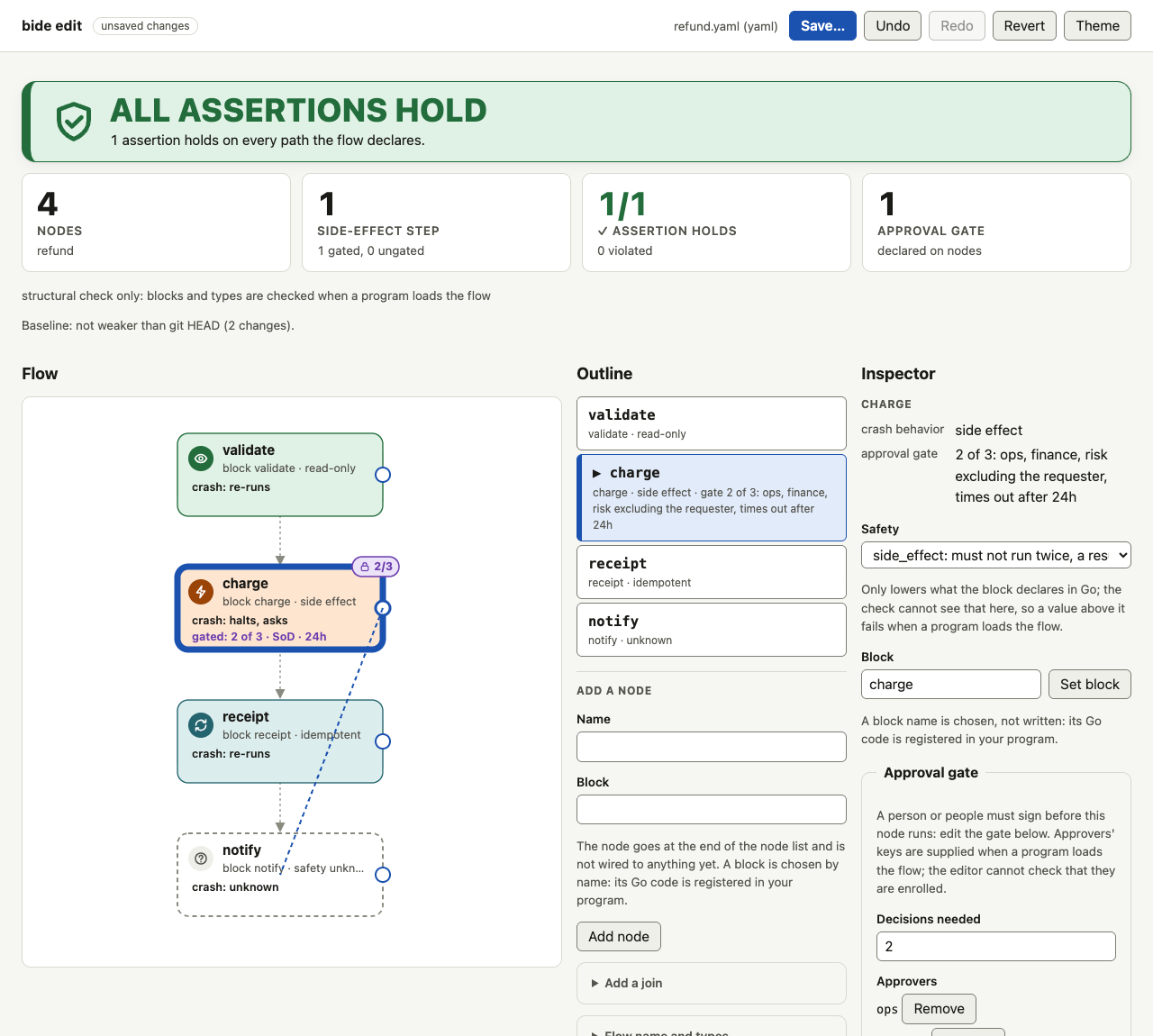
An extra, never the only way. Each node in the flow has a small circle at its right edge; drag it onto another node to add an edge from the first to the second. It sends the same add_edge the Connections form does, so it has the same refusals (an edge into a join, out of a switched node, a duplicate: the reason is shown and announced), the same verification, and shows the same weakened banner when the new edge reaches a gated node by another way. Dropping on the same node, on nothing, or pressing Escape cancels with no change; so does losing the pointer or the flow being redrawn mid-drag. It works with a mouse, a pen or a finger: the circle is drawn small but its touch target is at least 44 px, and a touch that starts anywhere else on the flow still scrolls the page. The circle is a pointer shortcut: it is hidden from assistive technology and is not in the Tab order, because every connection can be made, and removed, from the inspector by keyboard. In typed mode a drag between types that do not fit is refused with the same words as the form. In a dense flow, or with the drawing scaled down, the circle's touch target stops at a neighbour's edge instead of reaching over it (a press on the neighbour selects it, a drop onto it lands on it), so it is smaller than 44 px on that side. The layout stays derived: nothing about where a node is drawn is stored.
The assertions panel
Below the flow, the panel lists the config's assert lines, each with its verdict (holds, violated with the counterexample path, undecided, invalid), and a form to add one. An assertion is built from a form, not typed. The six forms of the grammar are the templates:
| Template (its name starts the label) | Writes |
|---|---|
| Approval: every path to a node passes a gate of at least K decisions | every path to <node> passes approval >= K [of N] [excluding the requester] |
| Passes: every path to a node passes another node | every path to <node> passes <node> |
| Terminal: every path to a terminal passes a node | every path to a terminal passes <node> |
| No side effect: nothing with a side effect comes after a node | no side effect after <node> |
| Reachable / Unreachable: a node can, or cannot, be reached | <node> reachable, <node> unreachable |
The page sends the form's parameters and the server writes the line, in the grammar plan reads, with a node name that has a space in double quotes; a name the grammar cannot hold (one with a double quote or a tab, or two spaces in a row) is refused, and only declared nodes can be chosen. While you fill the form, each change asks the server what the check says of the line and shows the verdict, the counterexample path of a violation included, before anything is added: the same call as an edit, not kept. A line the config already has is refused. Add assertion appends a line (creating the assert list if there is none), Edit (for a line that is one of the six forms) replaces it in place, Remove removes it (and the list, with its last line). Each is a splice, so a comment above a removed line goes with it and a trailing comment on a replaced one stays.
Assertions are checked by bide check and in CI, not at run time: plan.Load ignores assert lines and they are not in the digest, so adding one adds a check CI can fail on and not a guard on the run. The panel says so beside the list. Removing or loosening one is weakening, and the banner says so like any other weakening; an assert line that stops holding because of another edit is too (see The baseline and the weakened banner).
The baseline and the weakened banner
Every version of the file the page shows is compared with a baseline, the committed policy: the file at git HEAD, or at the revision -base names (a branch, tag or commit; bide edit -base main flow.yaml), or, when the file is not in git, the file as it was when bide edit opened it. The baseline is fixed when bide edit starts, so weakening in two edits is still weakening against the commit. The editor reads git only for this, with the same git show rev:./file that bide check -diff makes.
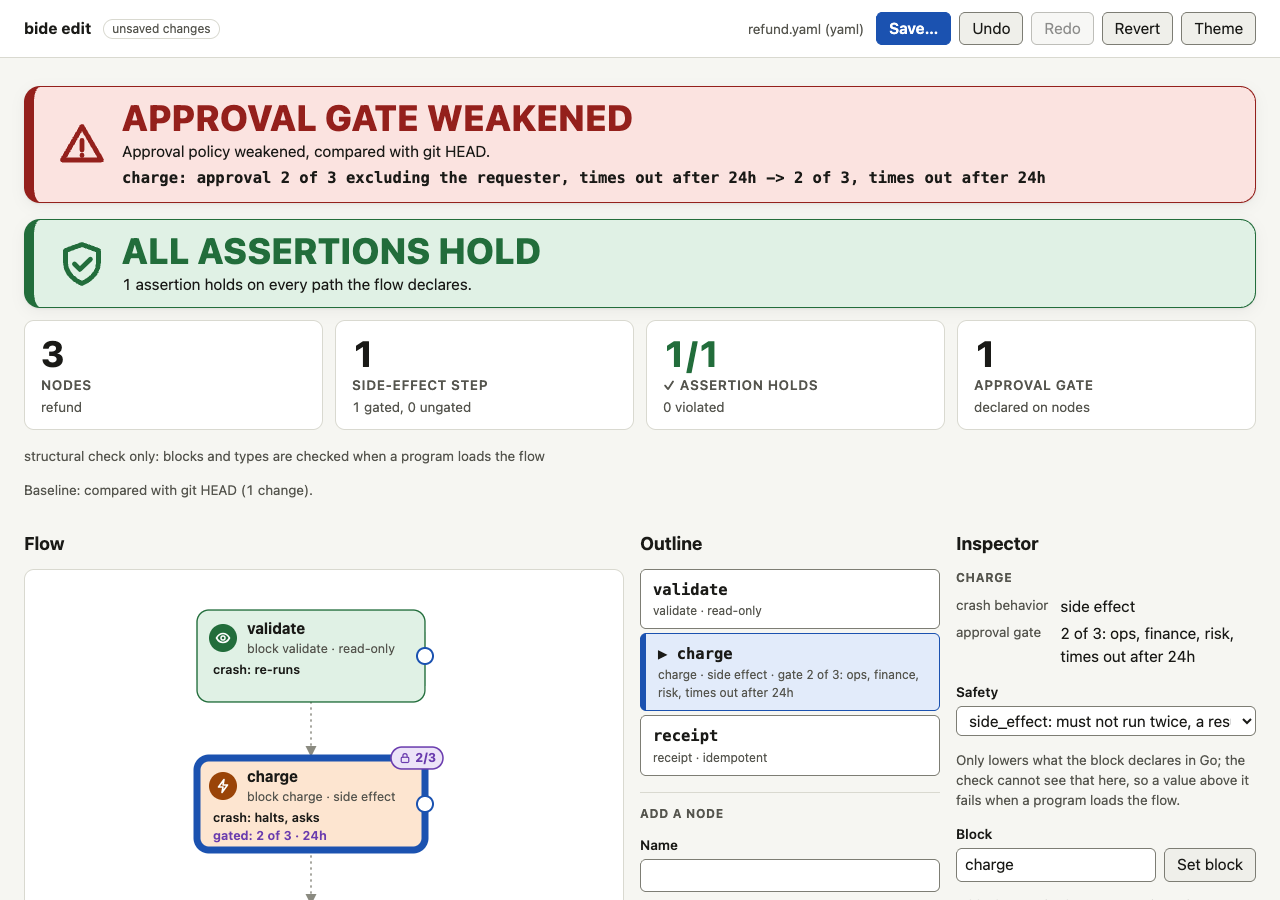
The comparison is the classifier bide check -diff -check -fail-on-weaken runs, not a second one: the editor shows what it returns. When the text is weaker than the baseline (a gate removed, its need lowered, an approver added without raising the need or replaced, exclude_principal or a deadline dropped or lengthened, an assert line removed, loosened or no longer holding, a node newly reachable without a gate (whatever its safety label; a lowered safety is itself reported), a block changed on an ungated effect node) the page shows a banner at the top: a glyph, APPROVAL GATE WEAKENED (or SAFETY CHECK WEAKENED when no gate policy itself changed), and each item (charge: approval 2 of 3 -> 1 of 3). The banner has no close control: a banner that can be closed is a warning that can be missed. It stays until the text no longer weakens, and it is announced to a screen reader as an alert. Below the verdict a line says what the file is compared with and how many changes there are, and which renames of this session it matched to their baseline nodes (see Nodes). If the text cannot be read as a config, the page says it cannot say whether it is weaker, which is not the same as not weaker.
What the classifier does not see applies here as it does in CI: from the command line a gate a block declares in Go is invisible on both sides, and a change of block on an ungated effect node is reported as weakened for that reason (see Compare two versions of a flow).
Editing the source and saving
The Source pane is a text area with the file's text. Typing in it asks the server for the check of the new text after a short pause, and every pane (the verdict, the flow, the outline, the assertions, the problems and the weakened banner) updates: the page validates nothing itself, so there is one validator, the one bide check runs, and a text the page accepts is a text CI accepts. Nothing is written until you save, and there is no autosave: a policy file should not change on a keystroke. The header says saved or unsaved changes, Revert puts back the text as it was last read or saved, and the page warns before it closes with unsaved changes.
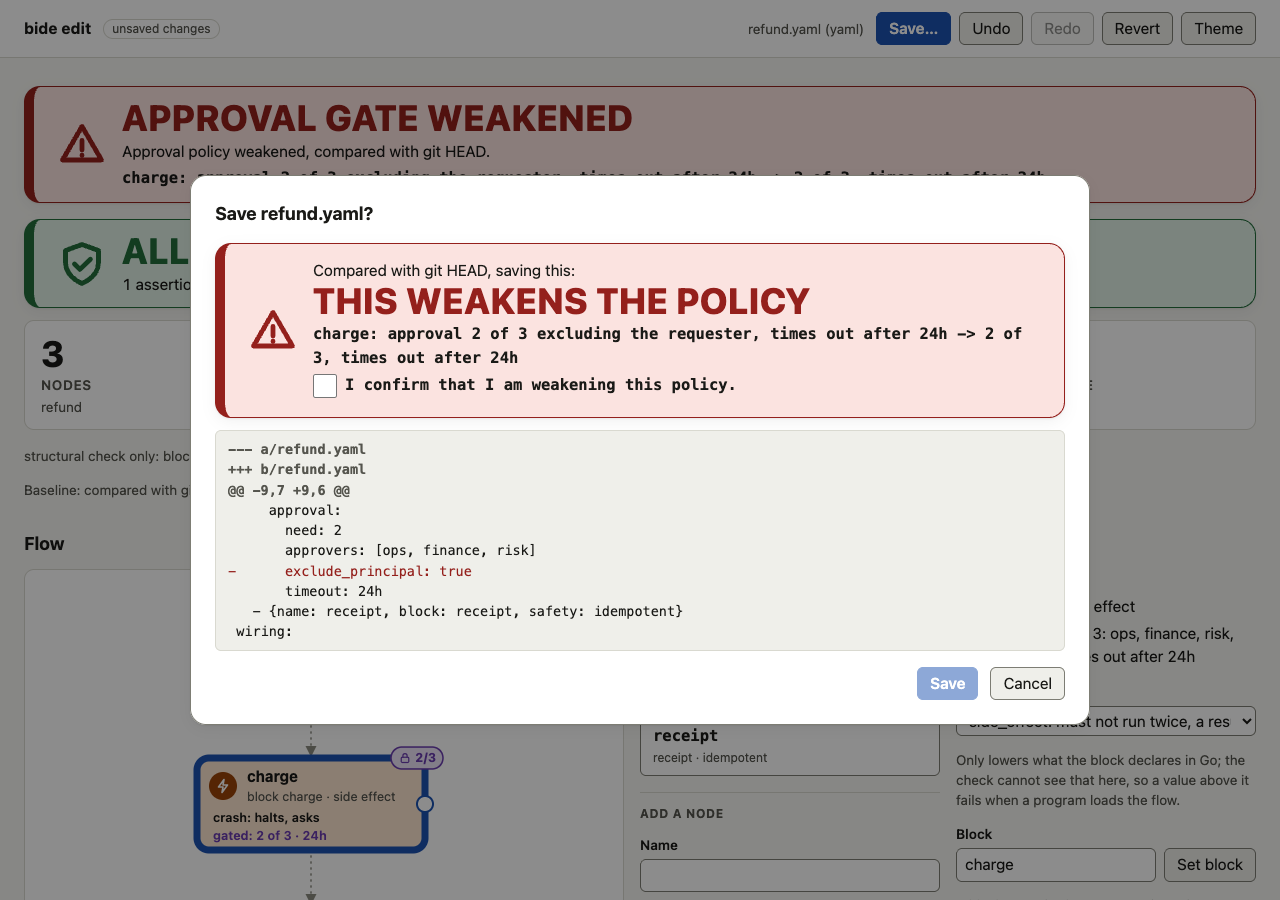
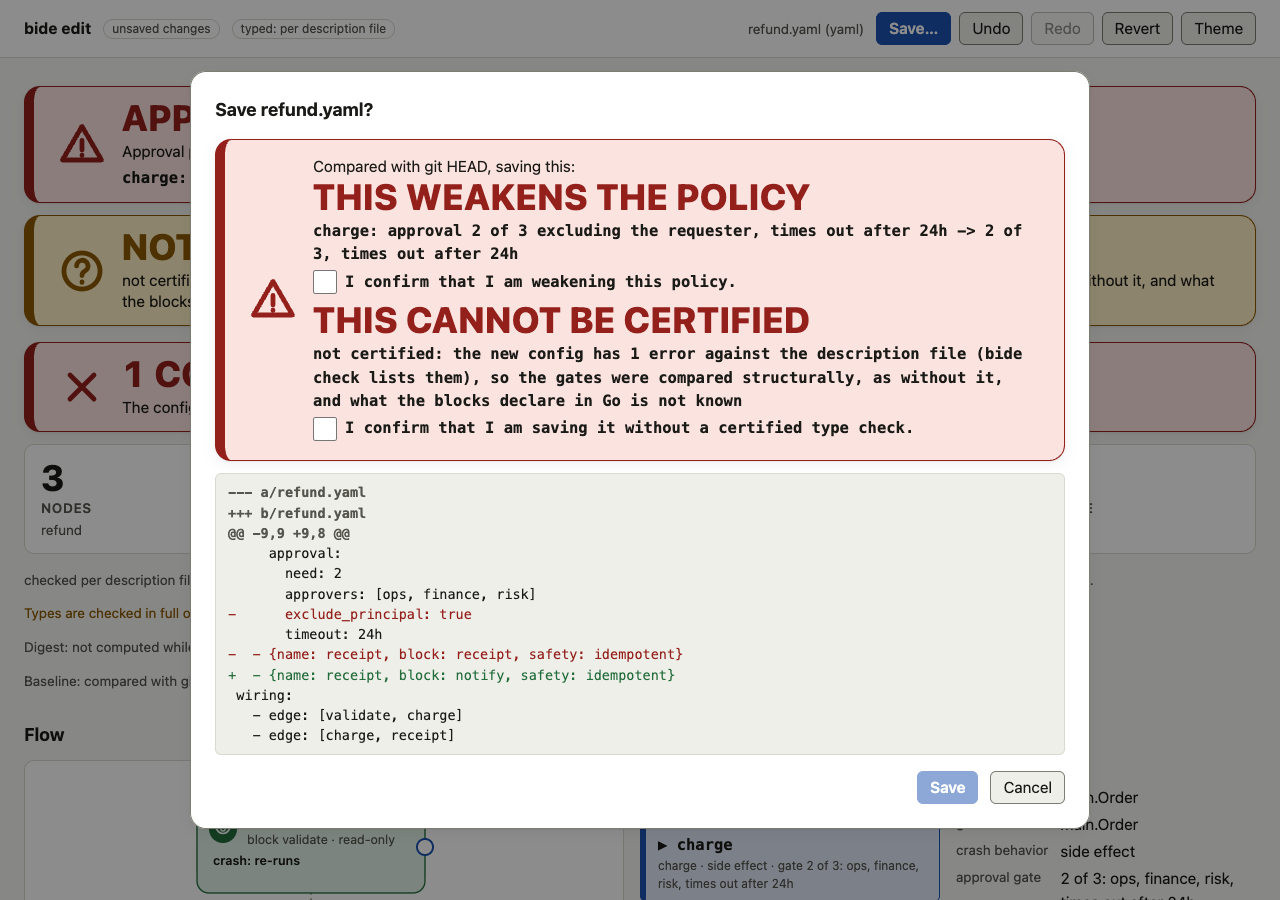
Save opens a dialog that shows what will be written:
- the plain unified diff of the bytes against the file on disk, so formatting churn and removed lines are seen before they are written;
- every comment the diff removes, listed, because a dropped comment is easy to miss in a long diff;
- how many errors the text has: a file with errors can be saved (a half-built flow must be holdable) and the dialog says it will fail
bide checkandplan.Loaduntil they are fixed; - if the text is weaker than the baseline,
THIS WEAKENS THE POLICYwith each item, and a checkbox: Save stays disabled until you confirm. The confirmation lists exactly the items the server computed for this text and is checked by the server, not only by the page: a save of a weakened text without it is refused (HTTP 422) and writes nothing, and a confirmation made for an older text does not cover a newer one. A text that could not be compared needs the same confirmation. The confirmation is not written into the file, which has no place for one and must not grow one: the control that stops a weakened policy merging is the pull request, wherebide check -diff -check -fail-on-weakenfails and a policy owner has to approve.
The write is atomic: the text goes to a temporary file in the same directory, which replaces the file by a rename, keeping its permission bits, so a reader sees the old file or the new one and a failure (a full disk, a permission) leaves the old file and no temporary file. The save carries the hash of the file as the page read it, and if the file on disk is different the answer is a conflict (HTTP 409): nothing is written, and the dialog shows the file on disk against your text and offers to reload (which replaces your edits) or to keep editing. It never overwrites. This is a compare-and-swap for a person editing in two places, not a lock: another process that writes between the check and the rename is overwritten.
The path is fixed at startup and checked again when writing: a target that has become a symbolic link, or a directory, or whose directory is no longer the one resolved at startup, is refused. The editor does not run git add, commit or push; you commit the file.
What a rename-over-the-file save does not keep: extended attributes, ACLs and SELinux labels, and, on Windows, it cannot replace a file another program holds open without sharing delete. Permission bits are kept, and so are the owner and group where the user may set them. A save is refused, and nothing is written, for a file that is read-only (the editor does not replace what its owner protected) and, on Unix, for a file that has other names (hard links), which would be left with the old text. Saves in one editor are serialized: of two over the same hash exactly one succeeds. The directory is opened once at startup and every read and write goes through that handle, so a directory swapped for a link later cannot redirect a save, and a file swapped in at the config's name is refused. A process killed mid-save leaves a private .bide-edit-* file beside the config, which the next bide edit in that directory removes when it is ours and over ten minutes old.
A file that is not a readable config (invalid YAML, a duplicate key, more than one YAML document) shows CONFIG DOES NOT PARSE and the reason, and no graph.
A policy owner's workflow
bide edit flows/refund.yamlin a checkout. The banner is empty: the file is the committed policy.- Select the node, change its gate (raise
need, add an approver, turn on separation of duties, set a deadline) or an assertion. The verdict, the problems and the banner follow each change; undo is one button. - If the banner says
APPROVAL GATE WEAKENED, the change loosens the policy against the commit. Undo it, or go on knowing that saving needs the confirmation and that CI will refuse the pull request until a policy owner approves it. - Save: read the diff (it is the edit and nothing else), confirm if asked, and commit the file with git. In CI,
bide check flows/refund.yaml -diff main -check -fail-on-weakenis the control; the editor shows the same verdict earlier.
Accessibility
The editor is built to be used without a pointer and without dragging.
- No operation needs a pointer or dragging (drag to connect is a shortcut for the inspector's add-edge control). Every control is a native button, field, select or checkbox, reached by Tab; one test drives the path of selecting a node, setting its safety, editing its gate, adding an assertion, undoing and redoing, and saving with the confirmation a weakening needs, by keyboard alone (the other controls are not each driven by a test). The outline is one Tab stop and the arrow keys, Home and End move between its nodes; Enter or Space selects. The nodes in the drawing are buttons too (Tab to them, Enter). The wiring list works the same way, with one Move pair for the selected element, and the flow's settings are a closed disclosure, so neither costs a Tab stop per element or field. Forms are real forms: every field has a label, an error is tied to its field, and the draft of a gate or an assertion says what the check thinks in a live region, rewritten only when its words change. Drag to connect is an extra for a pointer; nothing requires it.
- Skip links and landmarks (WCAG 2.4.1, bypass blocks). The first controls on the page are the links Skip to toolbar, outline, inspector, blocks (in typed mode) and assertions; the inspector and the assertions each begin with Skip to toolbar. A link is hidden until it has the focus, then drawn; Enter moves the focus to the region (to Save, the toolbar's first control, when there is something to save). From the assertion form, the toolbar is four key presses away this way (Shift+Tab to the region's link, Enter; the test bounds it at five). The page has labelled landmarks: the banner with a group of editor actions, the main region, the flow, the outline, the inspector (complementary) and the assertions, problems and source, so a screen reader's region navigation works too. Walking back with Shift+Tab over every control also stays under 50 presses; that bound only guards against the page growing a control at a time. The page has no keyboard shortcuts.
- Changes are announced through a live region (the selection,
Saved, an operation done or refused, the verdict, and an alert for the weakened banner), and the focus returns to the control you changed. The save dialog is a modal dialog: Tab stays in it, Escape closes it, and the focus goes back to where it was. - State is not carried by color alone. Verdicts, assertion states, gate badges and the weakened banner each have a glyph and words, the selected node in the outline a heavier edge, a bold name and a marker (a test checks the computed styles); the diff marks lines with
+and-. The page draws from the checked themes (Themes):light,darkandhigh-contrast, which the header button steps through, a theme file of your own with-theme, and-theme-defaultfor the start. A reader whose system asks for more contrast getshigh-contrast, and one whose system forces colors gets the system's colors. A program that embeds the editor can lock it to one theme, which hides the button. The selected node in the graph has a ring in the theme's focus color that is 7 px wide (the heaviest state stroke is 4.5 px), and the outline list marks it too, so the selection does not rest on color. A dialog dims the page with a shadow of the theme's scrim color; forced colors drop shadows, so there it does not dim, and keeps its own border in the system's color. The drawing's flowing dash stops underprefers-reduced-motion. - Tested.
go test ./floweditdrives the page in real Chrome (theEditor (Chrome)job): the whole path by keyboard alone (the script never uses the pointer and bounds the Tab presses it needs), and axe-core over the page in light, dark and high-contrast in five states (as opened, a node selected with its forms, a weakened banner, an assertion form with a violation, the save dialog), failing on any violation. Typed mode has its own run: the palette, a filtered list, a search with no match and the NOT CERTIFIED banner under axe-core in light, dark and high-contrast, the palette as one Tab stop with the arrow keys, and a drag refused by type with the same words as the form.
An automated check finds a fraction of the problems a person meets. A manual screen-reader pass has not been done: the checks above are not a substitute for one, and the checklist for it is in docs/KNOWN-LIMITATIONS.md.
Where it runs, and what it can touch
bide edit serves on a loopback address (-addr, default 127.0.0.1:8585) and refuses any other host, as bide view does. It reads and writes only the file named on the command line: that file must exist, be a regular file of at most 1 MiB and end in .yaml, .yml or .json; a symbolic link is resolved once at startup. There is no endpoint that opens another file. With a store (-db, -postgres, -postgres-env or -journal) it opens the store or stores you name (-journal can be given more than once) read-only, fixed at startup. With -run it reads the one run you name (an exported journal holds one run, so with several -journal files -run picks the file whose run ID it is; two files that hold the same run ID are refused as a usage error naming both, so a stale or substituted copy cannot stand in for the run); for the unfinished-runs panel it reads one small record per unfinished run (at most 5000 runs). The page cannot name another run or store, and no reply carries a record, a store path or a connection string.
The page is served by the binary, with no CDN, no web font and no request to another host, under a Content-Security-Policy that allows only same-origin script, style and requests and no inline script or style. Every request the page makes is a POST of application/json from the page's own origin carrying the session token, and the body is limited to 1 MiB; a request without them is refused. Config text is data: node names, block names and messages are put in the page as text, never as markup, and the graph (SVG the server escapes) is parsed as an XML document and adopted.
This defends against another web page or local process reaching the editor, and against a hostile config attacking the person who opens it. It does not defend against someone who controls the machine, who can edit the file directly.
bide edit is in the full bide binary and not in a bide_audit_only build, which holds no YAML reader and writes no files.
Compare with a run
New in v0.25.0 (experimental, like the flowedit package: the flags may change in a minor release).
bide edit -run r1 -db journal.db flow.yamlWith -run and a store (-db, -postgres, -postgres-env or -journal, the flags bide view takes and opened read-only), the page gains a line above the flow (the verdict word and the run's ID, with a link to the details) and, below the flow, a panel, Compared with a run. It reads the topology the run journaled (flow:topology, once its digest checks against flow:digest, as the viewer draws it) and compares the file with it by what the topology digest covers: the flow name, the entry, each node's name and block, the edges, the switches and their arms, and the order of all of them, and, when the editor knows the program's blocks (-blocks), each node's kind, types and gate. The panel opens with one of these, in words and not by colour alone:
- SAME DIGEST (typed mode): the file has the digest the run journaled. This says nothing about whether the run followed the file; that is conformance, which
bide viewshows. - NO DIFFERENCE SEEN (structural mode): no difference in the names, blocks, edges, arms or their order. Kinds, types and gates are not compared without
-blocks, so the panel does not say the topologies are equal; load the blocks to compare digests. - DIFFERS FROM THE RUN: it lists the changes the digest covers, one line each. The digest is part of what resume checks, so a run paused under that topology will not resume under this file. A renamed node is matched to its run self by the renames of this session and by the diff's own rename rule.
- CANNOT COMPARE: the file has errors (a typed file with errors has no digest) or does not parse.
A run that journaled no topology (it started before flow:topology existed), has not recorded its digest yet, or journaled a topology that does not match its digest is named as such, and nothing is drawn from it. A journal is data someone else wrote: its names are shown as text, a topology of more than 1000 nodes or 4000 edges and arms is refused, and the digest check shows the topology is the one its digest names, not that the run ran it (bide view -sth proves a journal).
Safety and assert lines are in neither a journal nor the digest, so they are not compared, and the only verdict made against a run is about gates, in typed mode: a new node with no gate, added since the run, is listed as a change and is not judged as a weakening against the run. This comparison never blocks a save and never changes the weakened banner, which stays a comparison with the committed file. The page reads the run once; Reload run starts a fresh read, and cancels the older one if it is still running. A read that fails (a dropped connection, a timeout, a journal in a format this version cannot read) is kept for three seconds so that typing does not read it again on every keystroke, and then tried again. From a store the page reads the run by point reads, never its history: the run's topology and digest, and whether it has an end marker (completed, aborted or cancelled; "ended (more than one end marker)" when it has several, since which was written first is not read; else "no end marker"); its record count is not shown. The run's flow is the one its topology names. Every name, flow name and message from the journal is shown with each character that does not print written out, as bide view does. The run and the store are fixed when the command starts. A program that embeds the editor with flowedit.New has no run comparison.
The run's path on the canvas
With -run the flow also shows where the run went. Each node the run ran has a ring and, under it, words: ran (or ran N times for a loop body), started, no result recorded (the body began and its end is not recorded) or paused at its approval gate. A solid ring is ran, a dashed ring is started, a dash-dot ring is paused, so the three are told apart without colour, and under forced colors the ring is still drawn. A dashed line over a connection means the run took it. The same words are on the node's name for a screen reader and under the node in the outline.
The path is the run's, laid on this file by name: a node is marked only when the file has a node of that name with the same block (and, in typed mode, the same kind); a rename made in this session carries its marks to the new name. What the file cannot show is listed under the panel, never dropped: a node the run ran that the file lacks, or has with another block (so it is another node), and a connection the run took that the file does not have between two marked nodes. When a loop's bound in the file is not the bound the run had, the connection says both. A node with no ring was not reached, or is not in the run. The path is read from the journal by a few point reads per node (at most 300 nodes; a larger flow says its path was not read). For a node outside a loop the reads do not grow with the run; for a loop body they grow with the iterations the journal holds, clamped at 100 per node whatever bound the topology claims. Where a loop stopped is said in the node's words: "ran 2 times, then started again, no result recorded", or "ran 2 times, then paused at its approval gate". If the path cannot be read (the store failed), the panel says so with the class of the failure ("store error", "timed out") and no more, and reads it again on the next request after three seconds or on Reload run: no text of a store's error is ever shown.
The unfinished runs this file would refuse
bide edit -db journal.db flow.yaml          # a store, no run
bide edit -run r1 -db journal.db flow.yaml  # a run too
With a store (-db, -postgres, -postgres-env or -journal), with or without -run, the page has a panel, Unfinished runs this file would refuse, and a button, Check unfinished runs. It answers the question an author has before merging: which runs that are waiting or in flight would be refused on their next drive (resume, recovery or restart) with this file, because the digest they recorded is not this file's (the topology digest, flow:digest; see Compare two versions of a flow). A process that is running keeps the flow it started with; this is about the next drive.
The list is the recovery pass's: runs with no end marker (no run:complete, run:aborted or run:cancelled), the engine's reserved runs left out. Per run the server reads one small record, flow:digest, never the run's history, and groups the runs by the digest they recorded. For the first run of each of at most 20 digests it reads run:start (the flow it is of) and flow:topology. The groups are then compared with the text on the page:
- REFUSED: the digest is not the file's (typed mode), or the topology differs from the file by what the digest covers (structural mode: names, blocks, edges, arms, order; kinds, types and gates are not compared without
-blocks). A digest that is not the digest of the run's own topology (a run recorded under digest v1, or a journal that does not match itself) is refused by a resume whatever the file says, and says so. - same digest (typed) or no difference seen (structural).
- another flow: the runs are of another flow than the file's name when the editor opened it, so this file is not theirs. A flow renamed in the editor still lists the runs of the flow it was, as refused, and says why: a drive of a run under another flow is refused.
- not compared, with the reason: which flow it is of, or its topology, could not be read; or the time budget of the structural comparison (10 s) was used.
A run with no flow:digest is either a flow run that has not recorded it yet (including one that crashed between its topology and its digest), which the digest rule does not refuse because resume records the digest of whichever flow resumes it, or a run that is not a flow run at all (an agent run has none). They are never counted as refused. To tell the two apart the panel reads one record, flow:topology, which a flow run writes just before its digest, for the first 20 of them: one that has it is a flow run that has not recorded its digest yet (and the flow it names is said), one without it is not a flow run or stopped before writing it, and the rest are counted and not told apart. A file with errors has no typed digest, so the panel says it cannot compare and lists nothing as refused.
The list says at least and the first 5000 by run ID when the store holds more unfinished runs than it reads; runs under a 21st or later digest are counted and not compared; a scan that runs past a minute says where it stopped. The comparison of a text with a scan is made once (a structural comparison of many groups can take seconds), and the scan is shared by requests that arrive together, kept until you press Read the store again, and not repeated when you edit the text: editing only changes what it is compared with, and the page says when the list was made for text it no longer holds. For each group it shows the command to open its first run in the editor, bide edit -run '<id>' <store flags> <file>, quoted for a POSIX shell, and none for an ID that holds a control or direction-changing character. The list is of the store you gave: runs in other stores are not seen.
Taint: what a declared source can do to a node
The page shows the static taint view of the flow, the analysis bide check prints (see Taint in a check): which declared sources of untrusted content may run before each node, and what the flow's taint policy would do to a node that can have a side effect. It is computed in Go from the text on the page; the page only draws it.
- Under each node are words ("reads untrusted: inbound-email", "escalates: reads inbound-email", "refused: reads inbound-email", "exempt: reads inbound-email", "source: inbound-email"; the drawing clips a line to 34 characters, and the outline, the inspector and the accessible name hold the whole text) and a ring inside its box whose pattern tells the states apart without color (dotted, solid, dash-dot, long dashes, thin). The same words are in the node's accessible name and in its button in the outline.
- The inspector has a Taint section for the selected node: the verdict, the sources it may read, the path from a source ("fetch > triage > refund", or "earlier in the flow's order" when no edge leads from the source), the sources it declares, its exemption, what the view cannot know, and a note that this is a may-view.
- The Taint panel has the headline, the count of nodes for each verdict, the side-effecting nodes that may read untrusted data, the ones among them whose escalation is not known because the policy is not given, the nodes that declare a source, and what the view cannot know; each node is a button that selects it, and a skip link reaches the panel. A change in what the page says is announced ("Taint changed: ...").
- The banner
UNTRUSTED EXPOSURE WIDENEDappears, with the weakened banners, when an edit makes a node that can have a side effect newly read untrusted data while the policy is known to be absent, or removes a source; when the policy gates or refuses the node, or it is exempt, the change is only listed in the baseline line's changes. When the taint cannot be compared the save is NOT CERTIFIED, as for any comparison that cannot be made.
It is exact only where the program's declarations are known: a structural editor says "taint: not known without -blocks" (in the panel, and in the inspector of each node) and gives no verdict on any node (it shows only a source the config itself states with untrusted:), and a description from before version 2 says it carries no taint declarations. The embedded editor knows a Registry but a Registry holds no flow policy, so give it with flowedit.WithTaintPolicy(policy) (the zero agent.TaintPolicy states that there is none; the option also overrides the taint_policy of a description given with flowedit.WithBlocks); without it a node that reads untrusted data is "reads untrusted" with the reason "taint policy not given", never "escalates". bide edit -blocks uses the description's taint_policy. No state is ever worded as safe: "no declared source before it" means only that, and the view cannot see an undeclared source, a run whose input is declared untrusted, or the taint of an agent or nested flow a block runs. A source that can itself have a side effect runs ungated for its own read; split the block.
Typed mode: the program's blocks
Alone, the editor knows block names only from the config, so it checks structure: it cannot check types, cannot see a gate or a safety class a block declares in Go, and cannot show the digest. Typed mode gives it the program's blocks, in one of two forms:
bide edit -blocks blocks.json flow.yaml: a description of the program's registrations, which the program writes once withjson.Marshalofplan.Registry.Describe(). The file is read once at start (a regular file of at most 1 MiB, strict JSON, validated), never uploaded by the page, and it is only a file: it can be stale or wrong, so every typed result is labelled checked per description file, not checked against the program. The check made with the program's ownplan.Registry(plan/planview, or the embedded editor below) is the control.- Embedding:
flowedit.New(path, flowedit.WithRegistry(reg))checks asLoaddoes, with the program's Registry. Register everything beforeNew; a Registry that reports errors (a duplicate) is refused, asLoadwould.ExampleWithRegistryin packagefloweditis a complete host.flowedit.WithBlocks(description)is the file form for a host that has the description as a value (it is copied). The two are alternatives.
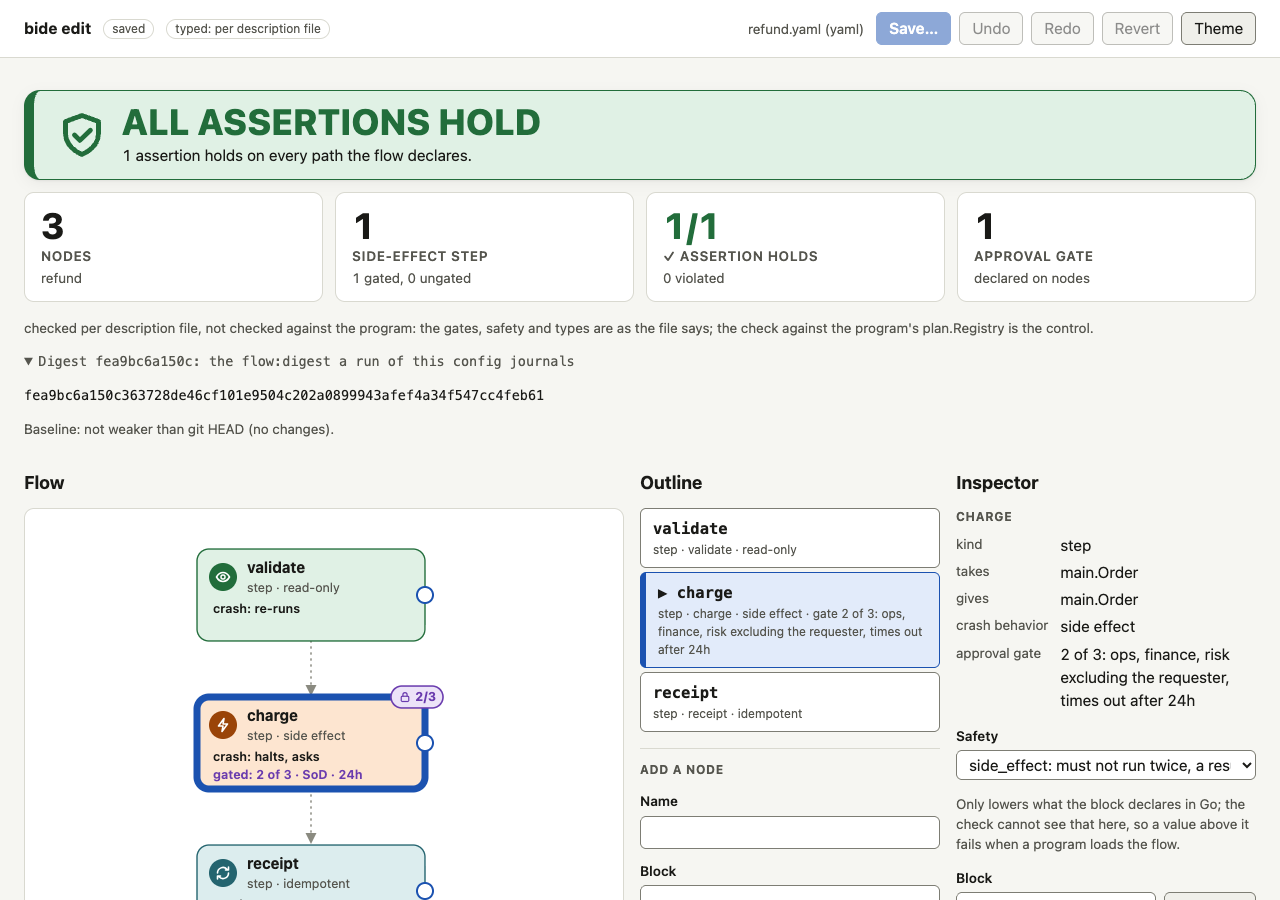
With either, the server checks every text with plan.InspectConfig (or InspectConfigDescribed) and plan.AllowUnusedBlocks(): a block the program offers that the config does not use is not a problem (a palette lists blocks that are not placed yet), though Load refuses it. The document the page reads gains typed: the source and the label, the digest a run would journal (while there are no errors), and the palette: each block and merge with its kind, input and output type names, declared safety and declared gate in words, and whether the config uses it; each node gains in and out, the type names the digest writes (from its block's description, so they are known while another node is not wired in yet). The page computes no types.
What the page shows. A typed: ... tag beside the saved state and the label under the verdict say what the check rests on (the program's Registry, or a description file, which is never shown as the program). Under it a disclosure holds the digest (the first 12 characters, the full value as text you can select; there is no copy button, which would need a clipboard permission some hosts do not give), or says it is not computed while the config has errors. A Blocks region (a skip link leads to it) lists the registered blocks and merges, each as a row spelled in words: charge step · takes plan.Order · gives plan.Receipt · safety side effect · approval 2 of 3: ops, finance, risk · used. A search narrows it by name; the checkbox Only blocks that fit the selected node (off by default: a hidden block is harder to explain than a long list) keeps the blocks that take what the node gives or that take and give what it does, by comparing the type names the server wrote as text. The list is one Tab stop, the arrow keys move through it, and two buttons act on the row you are on: Use as the block of the selected node (the merge of a join, for a join) and Add a node with this block, which fills the Add a node form with the block and an unused name and puts the focus on the name, writing nothing. In the connection forms a target whose type differs from what the node gives is marked (types differ) and stays selectable, so the reason is the server's. In a structural editor, or for a node whose block the program does not describe, nothing is marked and the inspector says the types are unknown.
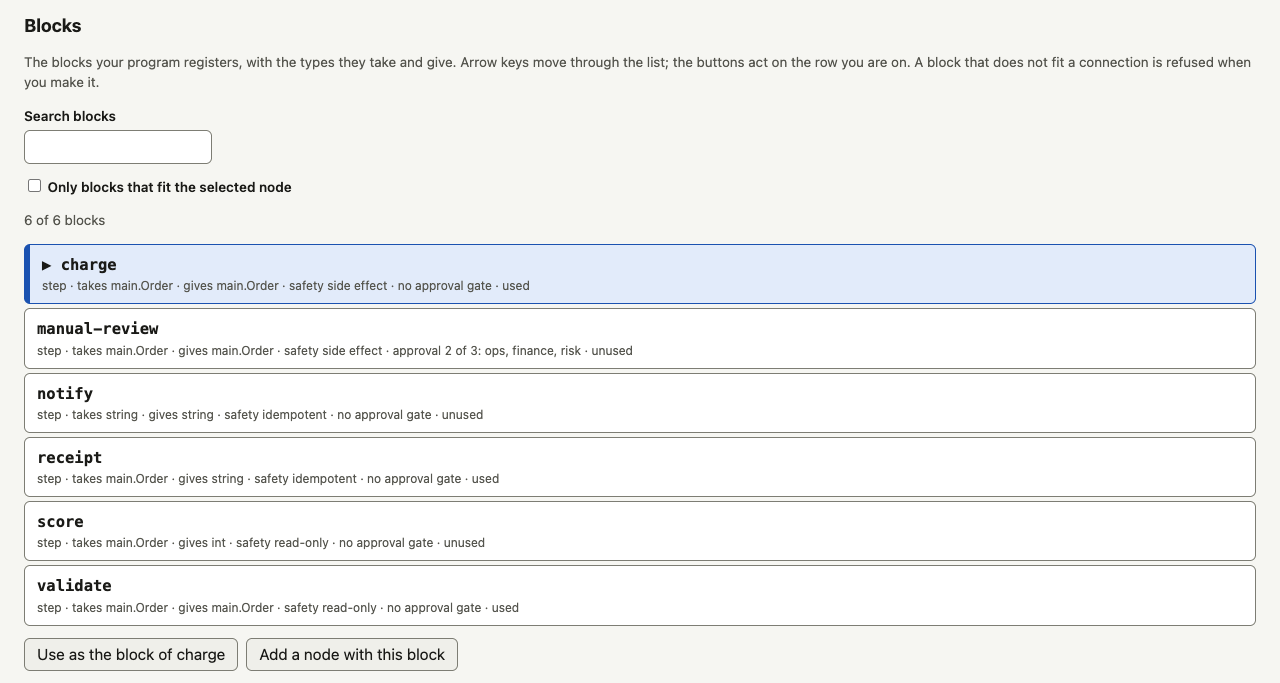
- A connection that does not fit is refused by the server, by the form, by a drag and by the palette, with
plan's own words ("the types do not fit: edge a to b connects X to Y"), shown where the form shows any refusal and announced. The page's marks never decide. The refusal does not wait for the rest of the config to be right:planfinds the type problems from the config and the registered types alone, for every part whose names resolve, so an unknown block or a bad safety elsewhere does not hide a misfit an edit adds. Problems are compared by their full names (not the shortened text shown) and not by the position of a wiring element, so moving an element does not make an old problem new. A safety stated above what the block registers in Go (anidempotentstep the program did not mark so) is refused the same way, since crash recovery would act on the false claim; other errors (a node not wired in yet, an unknown block) are allowed while you work, and the save then asks for the confirmation that the check could not certify the text. Every misfit is reported, not the first: an edit that adds a second misfit, a second loop-shape error or a second unreached node to a text that already had one is refused too, and the editor compares the complete lists of problems, not the first 100 the report prints. While the text before or after an edit does not parse, its problems are unknown, so only the operations that cannot change the graph, the blocks, the safeties or the declared types are let through (the approval and assertion forms andset_flow); any other is refused with "the config does not parse ... fix it first". - A text that has errors against the blocks shows a NOT CERTIFIED banner (its own alert, beside the weakened banner and never in place of it) saying the comparison was made without what the blocks declare in Go.
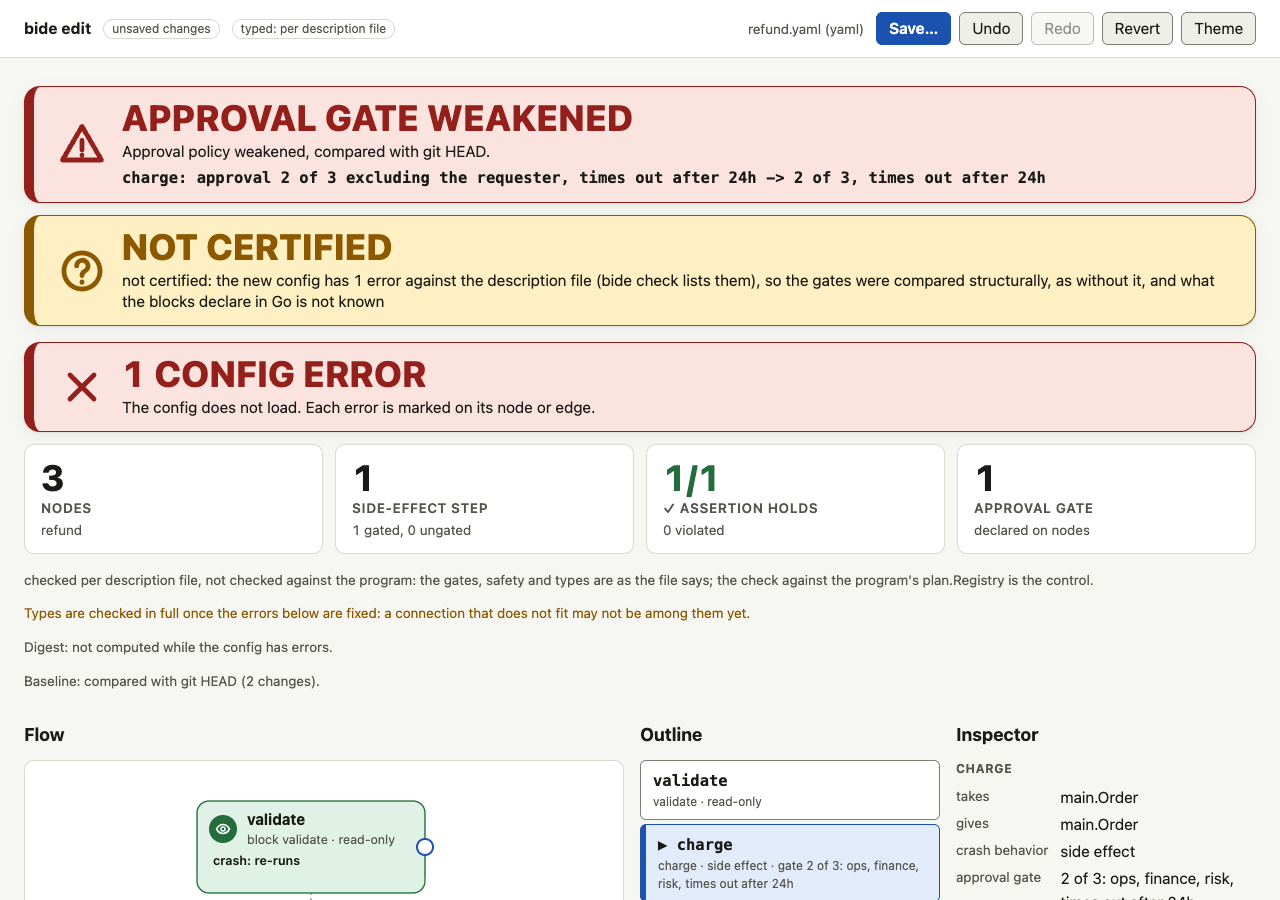
- Types are checked on every edit. An operation that connects what does not fit (a block whose input is not what the node before it produces, a predicate that tests another type than the switched node, a join input of another type than its merge takes, a terminal of another type than the flow's output) is refused by the server with
plan's reason, and the text does not change. A problem the text already had is not the operation's and does not refuse it. The structural editor takes the same operation and shows the result as a problem. - The weakened banner adds what the program knows and never says less. The editor does not know the program the baseline was written for (it may have changed since), so the verdict is the typed comparison (both texts read with the blocks as they are now, which knows the gate each block declares in Go: changing a block that declares an approval gate to one that does not reads as the gate removed) together with the structural comparison the structural editor makes, and a weakening either reports is reported and needs the confirmation. A block swapped away from one whose gate was removed in Go since the baseline is therefore still a possible weakening. A typed editor is never less strict than a structural one. When the text, or the baseline, has errors against the blocks (a block the program lacks, a type that does not fit), the comparison is the structural one, named not certified, and a save of it needs the same confirmation (the save dialog asks one statement at a time, each with its own box, worded from what the server says each item is and never from the page's own, possibly one edit old, view), even for a text that changes nothing: a file that does not check against the program should not look clean on a save. A gate removed in Go with the config unchanged is a change to the program, not to the config, and is not shown here (the structural editor does not show it either); review it in the Go diff, or compare the two programs' descriptions with
bide check -diff -blocks ... -old-blocks .... Supplying the baseline's blocks to the editor is a possible later option. - Limits. A description tells types apart by name only (two distinct types spelled alike are one; see the known limitations). A host that checks descriptions from sources it does not trust should do it in a short-lived process (a process keeps one stand-in type per type name it has been given, about 25 MB at most).
Flags
| Flag | Meaning |
|---|---|
-blocks | A description of the program's registered blocks: typed mode, labelled as per the file. See Typed mode. A file that cannot be read or is not valid makes bide edit exit 1. |
-base | Compare with the file at this git revision instead of at HEAD; the file must be in it, or bide edit exits 1. |
-run, -db, -postgres, -postgres-env, -journal | Compare the file with the topology a run journaled; see Compare with a run. -run needs exactly one store flag; a store without -run is for the list of unfinished runs (see The unfinished runs this file would refuse). A store that cannot be opened makes bide edit exit 1. |
-addr | Address to serve on: a loopback IP (127.0.0.1 or ::1) or localhost, with a port. Default 127.0.0.1:8585. |
-color | auto, always or never, for the line it prints. |
Exit status: 0 after a clean stop, 1 if the file cannot be read or the server fails, 2 for a usage error (including a non-loopback address).
Embedding
The command is a thin wrapper over package github.com/bide-ai/bide/flowedit: flowedit.New(path) returns a *Server whose Handler() is an http.Handler that does not depend on a listener or on the address, so another host can serve the same page. flowedit.BuildView is the page's data for a text: the same answers bide check gives, as a value. flowedit.Compare is the weakening verdict for a text against a baseline, and flowedit.WithBase is the -base option of flowedit.New. flowedit.WithRegistry and flowedit.WithBlocks make the editor typed (see Typed mode), and flowedit.WithTaintPolicy gives it the flow's taint policy (see Taint); a host can change the file, the base, the Registry or description, and nothing about who may use the editor: the loopback, Host, Origin and token checks, the content security policy and the one writable path are the handler's, whatever it is mounted on. flowedit.ApplyOperation applies one editor operation (set a node's safety or block, set or clear its approval gate: need, approvers, exclude_principal, timeout; add, replace or remove an assertion from one of the six forms, flowedit.Assertion) to a config's text by splicing, so comments, blank lines and key order stay and the diff of an edit is the edit; each result is verified, and what cannot be spliced safely is a *flowedit.Refusal with the text untouched. It is what the forms call, through POST /api/apply. flowedit.UnifiedDiff is the diff the dialog shows, and (*flowedit.Server).Save is the save, with the checks above.